
Picture a team drowning in endless task lists, unclear priorities, and constant confusion about who’s working on what. Now imagine transforming that chaos into a visual system where every task is visible, progress is transparent, and bottlenecks are immediately obvious. This is the power of Kanban boards, a deceptively simple yet profoundly effective approach to managing work that has revolutionized how teams operate across virtually every industry.
Originally developed by Toyota in the 1940s to optimize manufacturing processes, Kanban has evolved into one of the most widely adopted Agile methodologies for knowledge work. Recent industry data show a notable trend: 87% of teams report that Kanban boards are more effective than other project management methodologies. This isn’t just about software development anymore; marketing teams, HR departments, sales organizations, and even individual professionals are discovering how Kanban’s visual approach transforms productivity and collaboration.
In 2026’s fast-paced digital workplace, where remote teams collaborate across time zones and workloads continue to escalate, the need for transparent, flexible work management has never been greater. Kanban boards provide exactly that: a visual system that makes work tangible, limits work-in-progress to prevent overwhelm, and enables continuous flow rather than batch-and-queue approaches that create frustration and delays.
This comprehensive guide explores everything you need to understand and implement Kanban boards effectively. You’ll discover the fundamental principles that make Kanban work, learn how to set up boards that match your workflow, understand core practices that maximize benefits, explore the best tools available, and gain insights into avoiding common pitfalls. Whether you’re new to Kanban or looking to optimize existing boards, this guide provides the knowledge and practical strategies you need to transform how your team works.
Table of Contents:
- What Is a Kanban Board? Definition and Core Concepts
- Key Components of an Effective Kanban Board
- Implementing Kanban Boards: Step-by-Step Process
- Popular Kanban Board Tools and Software
- Best Practices for Maximizing Kanban Board Effectiveness
- Kanban vs. Scrum: Understanding the Differences
- Common Challenges and How to Overcome Them
- Career Growth with Kanban Expertise
- Conclusion
What Is a Kanban Board? Definition and Core Concepts
A Kanban board is a visual workflow management tool that represents work as cards moving through columns representing different stages of a process. At its most basic, a Kanban board consists of three elements: columns that represent workflow stages (commonly “To Do,” “In Progress,” and “Done”), cards representing individual work items or tasks, and work-in-progress (WIP) limits that control how many items can occupy certain columns simultaneously. This simple visual representation creates transparency, reveals bottlenecks, and enables teams to manage flow rather than merely track tasks.
The strength of Kanban lies in its visual nature. Instead of abstract task lists buried in spreadsheets or project management tools where work remains invisible until explicitly searched, Kanban boards make work tangible and status immediately obvious. Anyone glancing at a well-designed board instantly understands what work exists, which items are in progress, where bottlenecks occur, and what’s completed. This visual transparency fundamentally changes how teams communicate, collaborate, and make decisions about work.
Kanban boards operate on a “pull” system rather than “push” methodology. In traditional project management, work is pushed to team members: assigned tasks pile up in individual queues regardless of capacity. In Kanban, team members pull work from the backlog only when they have capacity, as indicated by WIP limits in each column. This pull approach prevents overloading individuals, reduces context switching, and ensures focus on completing work rather than starting everything simultaneously.
The word “Kanban” itself comes from Japanese, meaning “visual signal” or “card” a fitting name for a system built on visual communication. Toyota originally used physical cards attached to parts in their manufacturing process, signaling when new parts should be produced based on actual consumption rather than forecasts. Modern knowledge work Kanban boards apply the same principle: visual signals trigger work movement based on actual capacity and flow rather than arbitrary assignments or predictions.
The Core Principles of Kanban
Kanban operates on six fundamental principles that distinguish it from other Agile methodologies and traditional project management approaches. Understanding these principles is essential because they guide how you design boards, establish practices, and continuously improve your workflow.
Visualize the workflow represents the foundational principle: make all work visible so teams can understand the entire process from request to delivery. Visualization extends beyond simply creating columns, it includes making policies explicit (what does “Done” mean?), showing who’s working on what, revealing blockers or dependencies, and displaying metrics like cycle time. Effective visualization creates shared understanding and eliminates the hidden work that plagues many teams.
Limit work-in-progress (WIP) prevents the productivity-killing habit of starting too many things simultaneously. WIP limits create constraints that force teams to finish work before starting new items. When a column reaches its WIP limit, no new work can enter until something moves forward or is completed. This constraint can feel uncomfortable at first, especially for teams that are addicted to appearing busy by starting everything immediately, but it dramatically improves flow, reduces cycle time, and increases actual completion rates.
Manage flow shifts focus from resource utilization to workflow. Traditional management emphasizes keeping everyone busy; Kanban emphasizes moving work smoothly through the system. Managing flow means identifying and removing bottlenecks, optimizing handoffs between stages, reducing batch sizes, and ensuring work moves steadily rather than languishing in a queue. Teams measure flow using metrics like cycle time, throughput, and cumulative flow diagrams.
Making policies explicit eliminates ambiguity and invisible expectations that create confusion and conflict. Policies define entry and exit criteria for each column (when does work move from “In Progress” to “Review”?), prioritization rules (how do we decide what to work on next?), and quality standards (what does “Done” really mean?). Explicit policies enable self-organization because everyone understands the rules rather than needing constant managerial direction.
Implementing feedback loops ensures continuous learning and adaptation. Feedback loops occur at multiple levels: daily stand-ups that review board status and address blockers, regular retrospectives that examine processes and identify improvements, and service delivery reviews with stakeholders that assess whether delivered work meets needs. These structured feedback mechanisms prevent teams from blindly following processes that no longer serve them.
Improve collaboratively, evolve experimentally embraces evolutionary change rather than revolutionary transformation. Kanban doesn’t demand abandoning existing processes in favor of prescribed roles, ceremonies, and artifacts. Instead, it starts with current reality and improves incrementally based on data and experimentation. Teams hypothesize improvements, implement small changes, measure impact, and evolve gradually toward greater effectiveness.
How Kanban Differs from Traditional Project Management
Traditional project management typically relies on detailed upfront planning, fixed scope and timelines, and batch-and-queue workflows. Projects are planned comprehensively before execution begins, work is assigned and pushed to team members, and progress is measured against predetermined plans. When reality deviates from plans, as it inevitably does, teams either fall behind schedule or engage in painful replanning.
Kanban embraces uncertainty and change as natural conditions rather than deviations requiring correction. Instead of comprehensive upfront planning, Kanban starts with whatever work exists and begins flowing it through the system immediately. Instead of fixed scope and timelines, Kanban continuously prioritizes based on current information and capacity. Instead of measuring against plans, Kanban measures actual flow and continuously optimizes the system’s ability to deliver value.
This fundamental difference makes Kanban particularly effective for work characterized by variability, frequent change, or ongoing operations, rather than for distinct projects. Support teams handling unpredictable incoming requests, marketing teams managing campaigns with evolving requirements, and operations teams maintaining systems all benefit from Kanban’s flexible, flow-oriented approach that accommodates reality rather than fighting it.
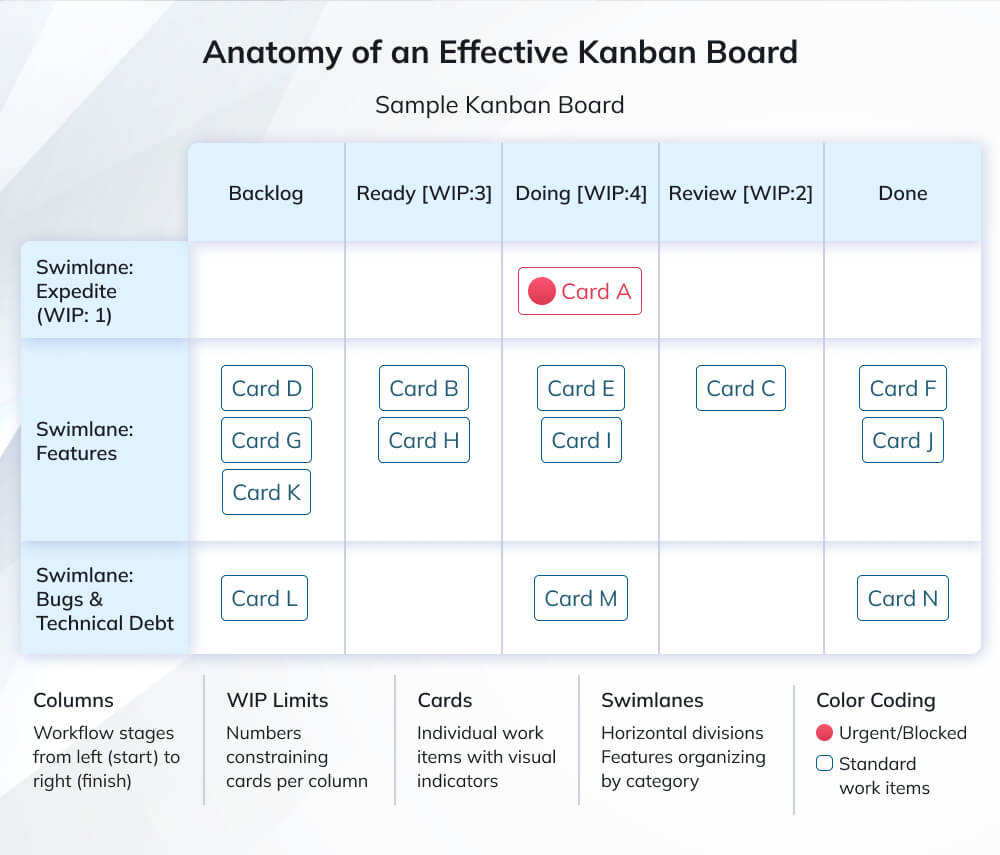
Key Components of an Effective Kanban Board
While Kanban’s simplicity is part of its appeal, effective boards require thoughtful design that reflects your specific workflow, team structure, and work characteristics. Understanding the key components and how to configure them appropriately makes the difference between boards that transform productivity and boards that become glorified to-do lists, providing minimal value.
Columns: Defining Your Workflow Stages
Columns represent the distinct stages work passes through from initiation to completion. The simplest boards use three columns, “To Do,” “Doing,” “Done” which works for straightforward workflows but proves inadequate for most real-world processes. Effective column design mirrors your actual workflow, making hidden stages visible and revealing where work actually waits or gets stuck.
Start by mapping your current process: What happens from the moment work is requested until it’s delivered? For software development teams, stages might include “Backlog,” “Ready for Development,” “In Development,” “Code Review,” “Testing,” “Ready for Deployment,” and “Done.” Marketing teams might use “Ideas,” “Planning,” “Content Creation,” “Review/Approval,” “Published,” and “Performance Tracking.” The key is honesty, model what actually happens, not what you wish happened.
Splitting columns reveals waiting states that often consume more time than active work. Instead of a single “Development” column, consider “Dev-In Progress” and “Dev-Complete/Waiting for Review.” This distinction makes visible the time work spends waiting rather than being actively worked on, often revealing shocking truths about where time actually goes. Teams frequently discover that 70-80% of cycle time involves waiting rather than active work, a revelation that redirects improvement efforts.
Column design evolves as teams gain insights. Start simple, observe where confusion or bottlenecks occur, and refine. If team members frequently disagree about which column work belongs in, your definitions need clarification. If work consistently piles up before a particular column, you’ve identified a bottleneck requiring attention. The board should be a living artifact that evolves to provide maximum insight and value.
Cards: Representing Work Items
Cards represent individual work items flowing through your system. Effective cards contain sufficient information for team members to understand what’s needed without requiring excessive detail that makes card creation burdensome. The right level of detail depends on work type and team experience; new teams need more detail, while experienced teams working on familiar work types need less.
Essential card information typically includes a descriptive title, a brief description or acceptance criteria, assignee or responsible person, priority or urgency indicator, and relevant tags or categories. Additional useful information might include estimated effort, due date, service-level expectations, links to related documentation, and blockers or dependencies. Digital boards enable attaching files, linking related cards, and adding comments, capabilities that enhance collaboration without cluttering the visual board.
Card size should be relatively consistent within a board. Mixing tasks requiring 30 minutes with projects requiring three weeks creates misleading visualizations and makes flow management difficult. If work items vary dramatically in size, consider splitting the board (one for large initiatives, another for small tasks) or breaking large items into smaller cards that flow through the board more naturally.
Color-coding and visual indicators make boards more informative at a glance. Use colors to represent work types (bugs, features, improvements), priority levels, or teams (in shared boards). Icons or labels can indicate blocked items, urgent work, or items approaching deadlines. Visual richness enhances the board’s communication power, but avoid visual clutter that overwhelms rather than informs.
Work-in-Progress (WIP) Limits
WIP limits represent Kanban’s most powerful and most challenging practice. These constraints limit how many cards can occupy specific columns simultaneously, forcing teams to finish work before starting new items. WIP limits counteract the deeply ingrained but counterproductive habit of starting everything immediately and juggling multiple tasks simultaneously, a pattern that creates stress, delays completion, and reduces quality.
Setting appropriate WIP limits requires experimentation and adjustment. A common starting point: set limits at or slightly below the number of team members working on that stage. For example, if three developers work on implementation, set the “In Development” WIP limit to 3 or 4. This forces developers to help each other complete work or address bottlenecks rather than each starting new work while existing work stalls.
WIP limits create healthy tension that drives improvement. When a column reaches its limit and new work can’t enter, teams must collaborate to move work forward: help colleagues complete their tasks, remove blockers, or address the bottleneck preventing flow. This constraint makes bottlenecks painfully obvious and creates urgency to resolve them rather than working around them by starting more work.
Expect resistance when implementing WIP limits. Team members accustomed to appearing busy by juggling many tasks simultaneously will feel uncomfortable when limits prevent starting new work. Managers conditioned to measure productivity by resource utilization will worry about “idle” team members. Overcoming this resistance requires education about the difference between being busy and delivering value, plus data showing that reduced WIP actually increases delivery speed.
Swimlanes: Organizing Work by Category
Swimlanes are horizontal divisions within a board that organize cards by category while maintaining the same column structure. Common uses include separating work types (features, bugs, technical debt), distinguishing teams sharing a board, prioritizing urgent work (expedite lane), or tracking different projects or products on a shared board.
An expedite lane represents one of the most valuable swimlane uses. This lane accommodates urgent work that must bypass normal queuing and WIP limits, ensuring critical issues get immediate attention. However, expedite lanes require discipline: if everything becomes “urgent,” the lane loses meaning. Establish clear criteria for expedite work (production outage, critical customer issue, security vulnerability) and monitor expedite frequency, high expedite usage indicates planning or quality problems requiring attention.
Swimlanes add visual complexity, so use them judiciously. Too many swimlanes create cluttered boards that sacrifice the visual clarity that makes Kanban effective. For complex scenarios requiring many categories, consider creating multiple boards rather than cramming everything into a single overcomplicated view. The goal is clarity, not comprehensiveness.
| PRO TIP
Start with fewer columns and add more later rather than beginning with overly complex boards. New Kanban teams often create elaborate boards with 8-10 columns trying to capture every nuance of their workflow. This complexity overwhelms team members and obscures rather than reveals insights. Begin with 4-5 columns representing major stages, use the board for several weeks, and add columns only when you’ve identified specific visibility gaps. Evolution beats elaborate initial design every time. |
Implementing Kanban Boards: Step-by-Step Process
Successfully implementing Kanban boards requires more than creating columns and moving cards, it demands thoughtful planning, team engagement, and commitment to the underlying principles. Following a structured implementation approach increases the likelihood of sustainable adoption and actual workflow improvement rather than superficial tool usage.
Step 1: Map Your Current Workflow
Begin by understanding how work actually flows through your team currently, not how you wish it flowed or how processes document it should flow. Gather your team and walk through a recent work item from initiation to completion, documenting every stage, handoff, waiting period, and decision point. This exercise often reveals surprising truths about where time actually goes and why work takes longer than expected.
Create a simple flowchart or stage list representing your current state. Be honest about messy reality: If work frequently bounces back and forth between stages, document that. If items wait for days or weeks in “awaiting approval” limbo, make that visible. If different work types follow entirely different paths, acknowledge that complexity. The goal isn’t creating an idealized process but honestly representing current reality as the foundation for improvement.
Involve the entire team in this mapping exercise rather than having managers create the board in isolation. Team members doing the actual work understand nuances, waiting states, and frustrations that distant managers miss. Co-creating the board builds ownership and ensures the resulting design actually helps rather than imposing another management reporting tool that adds bureaucracy without value.
Step 2: Design Your Initial Board
Translate your workflow map into board columns, starting simple rather than trying to capture every nuance immediately. Aim for 4–6 columns initially: too few oversimplifies and hides important stages, while too many creates confusion and overhead. Remember, you can evolve the board structure later as you gain experience and identify specific needs.
Define clear policies for each column: What does it mean for work to be in this stage? What criteria must be met before moving to the next column? Who’s responsible for work in this stage? Making these policies explicit prevents confusion and enables self-organization. For example, your “Ready for Development” column policy might specify: “Requirements clarified, designs approved, no blocking dependencies, assigned to specific developer.”
Establish initial WIP limits for “in progress” columns (not backlog or done). A reasonable starting point: number of team members working on that stage plus one or two. These limits will feel uncomfortable initially, that’s normal and indicates they’re actually constraining behavior. Commit to observing how limits affect flow before adjusting, resisting the temptation to immediately raise limits when they create discomfort.
Choose your tools: physical board or digital platform. Physical boards offer unmatched visibility (they’re always visible on the wall), kinesthetic satisfaction (moving physical cards feels good), and accessibility (no login required). Digital boards provide remote access (critical for distributed teams), history tracking, automation, and integration with other tools. Many teams use both: a physical board for team room visibility, a digital board for remote access, and data capture.
Step 3: Populate the Board and Start Flowing Work
Transfer existing work items onto the board in their current stages. Don’t worry about perfection, just get work visible. This initial population often reveals uncomfortable truths: far more work-in-progress than expected, forgotten items that haven’t moved in weeks, or massive backlogs that nobody consciously prioritized. These revelations, while sometimes painful, provide valuable data for improvement.
Begin pulling work through the system using your defined policies and WIP limits. Team members pull new work when they have capacity rather than having work pushed to them. This pull approach fundamentally changes dynamics: individuals take ownership of work they selected rather than resentfully dealing with assignments, and the system naturally self-regulates to match capacity.
Hold brief daily stand-ups focused on the board rather than individual status reports. Walk the board from right to left (finish to start) and discuss: What’s blocked or at risk? What’s moving to completion today? Where are we approaching WIP limits? This board-centric stand-up focuses on flow and collaboration rather than individuals defending their busyness.
Step 4: Measure, Learn, and Evolve
Track basic flow metrics from day one: cycle time (how long from start to finish), throughput (how many items completed per week), and WIP trends (how much is in progress over time). These metrics provide objective data about system performance and improvement over time. Most digital Kanban tools generate these metrics automatically; for physical boards, simple tracking in a spreadsheet suffices.
Conduct regular retrospectives examining both board design and work practices. What’s working well? Where do items consistently get stuck? Are WIP limits appropriate, or do they need adjustment? Are column definitions clear, or do we frequently debate which column work belongs in? Use these insights to evolve the board incrementally rather than rigidly maintaining the initial design.
Celebrate improvements and share success stories. When cycle time decreases, a bottleneck is resolved, and team satisfaction increases, make these wins visible. Positive reinforcement sustains momentum and builds support for continuing the Kanban journey rather than reverting to old patterns when challenges arise.
| AVOID THIS MISTAKE
Creating a Kanban board but continuing to manage work through emails, spreadsheets, or verbal assignments outside the board. Why it’s problematic: The board becomes a reporting artifact that duplicates work rather than the system of work itself. Team members view the board as additional overhead rather than a helpful tool, leading to abandonment or minimal compliance, with cards updated only for status meetings. What to do instead: Commit to the board as the single source of truth for work. All work goes on the board, work is pulled from the board, and status is visible on the board. If work is happening outside the board, either it should be on the board or it’s not actually important enough to do. This requires discipline initially but pays enormous dividends in transparency, communication, and team cohesion. |
Popular Kanban Board Tools and Software
While Kanban originated with physical cards and boards, modern teams typically implement Kanban using digital platforms that provide enhanced functionality, remote accessibility, and automated metrics. Understanding the landscape of available tools helps you select options that match your team’s needs, technical environment, and budget.
Digital Kanban Platforms
Trello is the most widely adopted Kanban tool, known for its simplicity, intuitive interface, and free tier that supports small teams. Trello’s card-and-board metaphor directly mirrors physical Kanban boards, making it immediately familiar to new users. The platform offers power-ups (integrations), Butler automation, and mobile apps for on-the-go access. Trello works well for simple workflows, small teams, and those prioritizing ease of use over advanced features. Limitations include basic reporting, limited workflow automation, and scaling challenges for complex enterprise needs.
Jira is the enterprise standard for software development teams, offering sophisticated Kanban boards alongside Scrum boards, advanced reporting, and deep integration with development tools. Jira’s strength lies in customization, scalability, and comprehensive project tracking capabilities. The platform supports complex workflows, detailed issue tracking, and extensive automation. However, Jira’s power comes with complexity; new users face steeper learning curves, and configuration often requires administrative expertise. Pricing scales with team size, making Jira a significant investment for large organizations.
Monday.com provides highly visual, customizable work management with Kanban views as one of many available perspectives. The platform emphasizes visual appeal, ease of customization, and accessibility for non-technical teams. Monday.com’s flexibility allows teams to create boards, timelines, calendars, and charts from the same underlying data. The tool works well for cross-functional teams, marketing organizations, and those requiring diverse views of work beyond pure Kanban. Trade-offs include higher pricing and potential complexity from extensive customization options.
Asana balances simplicity and power with Kanban boards, list views, timeline views, and calendar views all available from the same project. Asana emphasizes task management clarity, portfolio management for multiple projects, and team collaboration features. The platform suits teams seeking straightforward project management without overwhelming complexity. Asana’s free tier supports small teams, while paid tiers unlock advanced features like custom fields, timeline views, and workload management.
ClickUp positions itself as the “everything app” combining Kanban boards, docs, goals, time tracking, and more in a single platform. ClickUp offers extraordinary customization, generous free tier, and comprehensive feature set rivaling multiple separate tools. This comprehensiveness appeals to teams wanting unified tooling but can overwhelm those seeking simple Kanban implementation. ClickUp works well for teams willing to invest time in configuration to create highly tailored workflows.
Specialized and Open-Source Options
Kanban Tool focuses specifically on Kanban methodology with features designed explicitly for Kanban practices: swimlanes, WIP limits, lead time tracking, and process analytics. This specialization provides better out-of-box Kanban experience than general-purpose project management tools repurposed for Kanban. Kanban Tool suits teams serious about Kanban practices and wanting tools designed specifically for the methodology.
Wekan offers open-source, self-hosted Kanban boards for teams prioritizing data control, customization, or cost minimization. As open-source software, Wekan requires technical setup and maintenance but provides complete control over data, unlimited users at no licensing cost, and the ability to customize code. Wekan suits technical teams comfortable with self-hosting or organizations with data sovereignty requirements preventing cloud tool adoption.
Microsoft Planner integrates Kanban boards within the Microsoft 365 ecosystem, making it attractive for organizations already invested in Microsoft tools. Planner offers straightforward Kanban functionality, seamless integration with Teams, Outlook, and SharePoint, and no additional cost beyond existing Microsoft 365 licenses. The tool works well for teams seeking adequate Kanban functionality within their existing technology stack rather than best-in-class specialized tools.
Selecting the Right Tool
Tool selection should prioritize actual needs over feature lists or marketing claims. Consider team size and distribution (remote teams require digital tools with robust mobile access), existing technology ecosystem (tools integrating with current systems reduce friction), workflow complexity (simple workflows need simple tools; complex workflows justify sophisticated platforms), budget constraints (free tiers work for small teams; enterprise platforms require investment), and technical capabilities (less technical teams need intuitive interfaces; technical teams can leverage powerful but complex tools).
Start simple and scale up if needed rather than beginning with overly complex platforms. Many teams successfully use Trello or physical boards initially, then migrate to more sophisticated tools only when they’ve identified specific capabilities they need. Over-engineering tool selection delays actually implementing Kanban practices that deliver value.
Best Practices for Maximizing Kanban Board Effectiveness
Implementing a Kanban board represents just the beginning; consistently applying best practices determines whether your board becomes a transformative workflow tool or another abandoned management fad. These proven practices help teams extract maximum value from Kanban while avoiding common pitfalls that undermine effectiveness.
Keep the Board Updated in Real-Time
The board’s value depends entirely on accuracy: outdated boards mislead rather than inform. Establish the practice of updating cards immediately when status changes rather than batching updates for stand-ups or status meetings. When you start working on a card, move it immediately. When you complete work, update the status immediately. This real-time accuracy ensures the board provides trustworthy information for decision-making and collaboration.
Resist the temptation to update boards only for status meetings or manager reviews. This pattern signals that the board serves reporting purposes rather than supporting the team’s work, rapidly undermining adoption. When team members view the board as management overhead rather than a personal productivity tool, they’ll use it minimally and work around it, undermining its value.
Use Daily Stand-Ups Focused on Flow
Transform daily stand-ups from individual status reports into board-centric flow discussions. Walk the board from right to left (completion toward start), asking: What’s completing today? What’s blocked? Where are we approaching WIP limits? What should we pull next? This board’s focus shifts the conversation from individuals justifying their busyness to collective responsibility for completing work.
Keep stand-ups brief and focused: 15 minutes maximum for typical teams. The board provides visual context, eliminating the need for lengthy verbal explanations. When detailed discussions arise, capture them as follow-up conversations with the relevant subset rather than holding the entire team. Stand-ups should coordinate work and identify obstacles, not solve every problem.
Respect WIP Limits Consistently
WIP limits only work if actually enforced. When a column reaches its limit, stop starting new work and focus on completing existing work or removing bottlenecks preventing flow. This discipline feels uncomfortable, especially when “important” new work arrives, but it’s precisely this constraint that drives improvement.
Establish clear protocols for exceptional situations requiring WIP limit violations. For example, production emergencies might justify expedited work that bypasses limits. However, track these exceptions and review them regularly. Frequent violations indicate either overly restrictive limits or systemic issues (elevated urgency, poor planning) that require attention.
Make Blockers Visible and Address Them Promptly
Use visual indicators (red cards, blocker flags, specific symbols) to make blocked items immediately obvious. When work can’t progress due to dependencies, approvals, or obstacles, the blockage should be clearly visible rather than hidden until someone asks. Visible blockers create urgency for resolution and prevent blocked work from being forgotten.
Hold regular blocker resolution sessions where the team collectively addresses obstacles. Often, blockers persist because resolving them requires cross-functional coordination or uncomfortable conversations nobody wants to initiate. By making blocker resolution an explicit, regular team activity, you normalize addressing obstacles and build momentum toward eliminating systemic friction.
Review Metrics and Continuously Improve
Track and review flow metrics regularly: cycle time (from start to finish), throughput (completed items per period), and cumulative flow (work in each stage over time). These metrics provide objective data about system performance and reveal trends: Is cycle time increasing or decreasing? Are we completing more or less work? Where does work accumulate?
Use metrics to drive improvement conversations rather than individual performance evaluations. Kanban metrics illuminate system performance, revealing bottlenecks, process inefficiencies, and opportunities for improvement. Weaponizing metrics for individual assessment destroys psychological safety and encourages gaming metrics rather than genuinely improving flow.
Kanban vs. Scrum: Understanding the Differences
While both Kanban and Scrum fall under the Agile umbrella, they represent fundamentally different approaches to managing work. Understanding kanban vs. scrum helps teams select the most appropriate methodology or thoughtfully combine elements from both to create hybrid approaches matching their specific context.
Workflow structure represents a primary distinction. Scrum organizes work into fixed-length sprints (typically 2-4 weeks) with defined ceremonies: sprint planning, daily stand-ups, sprint review, and retrospective. Each sprint begins with planning, executes committed work, and ends with review and retrospective. Kanban provides continuous flow without time-boxes: work items flow through the system continuously, entering when capacity exists and completing when done. No artificial sprint boundaries divide time.
Commitment and planning differ significantly. Scrum teams commit to specific work for the sprint duration during sprint planning, creating a contract to deliver defined scope. Changing mid-sprint scope is discouraged and requires sprint renegotiation. Kanban enables continuous reprioritization: as work completes and capacity opens, teams pull the highest priority item from the backlog regardless of when previous work started. This flexibility accommodates changing priorities and emergent work naturally.
Roles and ceremonies show stark contrast. Scrum prescribes three roles (Product Owner, Scrum Master, Development Team) and mandatory ceremonies. Kanban prescribes no specific roles or ceremonies, allowing teams to maintain existing structures and gradually evolve practices. This lightweight approach makes Kanban easier to adopt for teams not ready for Scrum’s more prescriptive framework.
Metrics and measurement emphasize different aspects. Scrum focuses on velocity (story points completed per sprint) and sprint burndown, measuring whether teams meet sprint commitments. Kanban emphasizes cycle time, throughput, and cumulative flow, measuring how efficiently work flows through the system and where bottlenecks occur.
Change philosophy reveals different orientations. Scrum protects sprint integrity: once committed, scope remains fixed to enable focused execution and predictable delivery. Kanban embraces continuous change: priorities shift as information emerges, and teams respond fluidly. Scrum suits situations requiring predictability and stakeholder confidence in delivery dates; Kanban suits situations requiring flexibility and responsiveness to rapidly changing needs.
Neither methodology is universally superior; each serves different contexts effectively. Scrum works well for product development with clear release cycles, teams benefiting from time-boxed focus, and environments requiring sprint-level predictability. Kanban excels for operations and support work with unpredictable incoming requests, teams needing extreme flexibility, and situations where work items vary dramatically in size or complexity.
Common Challenges and How to Overcome Them
Even well-designed Kanban implementations encounter obstacles. Anticipating common challenges and understanding proven solutions increases the likelihood of sustainable adoption and continuous improvement rather than abandonment when difficulties arise.
Challenge: Team members resist WIP limits and want to work on everything simultaneously
Many people equate being busy with being productive, measuring their worth by how many things they’re juggling. WIP limits feel constraining and create discomfort when they prevent starting new work. Team members may try to circumvent limits by splitting cards artificially, working on items “outside the board,” or constantly requesting limit increases.
Solution: Education and data defeat this resistance. Explain the counterintuitive reality that starting less enables finishing more by reducing context switching, improving focus, and preventing bottleneck accumulation. Track and share data showing that lower WIP actually increases throughput, most teams are shocked to discover they complete more work with less in progress. Celebrate completion over starting, reinforcing that value comes from finished work, not work in progress.
Challenge: The board becomes outdated and stops reflecting reality
Teams start strong but gradually let the board fall behind: cards don’t move when work progresses, completed work stays in “In Progress,” and new work doesn’t get added. The board becomes a meaningless artifact maintained only for status meetings, destroying its value.
Solution: Make board updates part of the workflow rather than separate overhead. Use tools with low-friction updating (mobile apps, quick keyboard shortcuts). Discuss outdated boards in retrospectives: Why is this happening? Too cumbersome to update? Not providing enough value to justify effort? Fix the root cause rather than demanding more discipline. Sometimes the solution is simplifying the board structure to reduce the update burden.
Challenge: Everything becomes urgent, overwhelming the system
Without clear prioritization, every request gets labeled “urgent” or “high priority,” creating an expedited lane filled with supposedly urgent work and destroying the ability to plan or maintain flow.
Solution: Establish explicit criteria for urgency and escalation. True urgency relates to business impact (production outage, critical customer issue, security vulnerability, regulatory deadline), not stakeholder intensity or political pressure. Designate someone (product owner, team lead) with authority to prioritize and say “no” to false urgency. Track the expedited work percentage; if it exceeds 10-15%, investigate the root causes: Are we experiencing a genuine crisis, or is it symptomatic of poor planning, unrealistic commitments, or mismanagement of stakeholder expectations?
Challenge: Distributed teams struggle with board visibility and collaboration
Remote teams can’t gather around a physical board, and digital boards often get forgotten when not visible in browser tabs or dashboards. Time zone differences complicate synchronous stand-ups and collaboration.
Solution: Make the digital board the single source of truth and establish norms for asynchronous collaboration. Use video stand-ups or recorded async updates where team members share board updates on their schedule. Leverage board automation (notifications for blocked items, approaching deadlines, WIP limit violations) to create awareness without requiring constant checking. Consider hybrid approaches: physical board in main office, digital board for remote visibility and system of record.
Career Growth with Kanban Expertise
As Kanban adoption accelerates across industries, professionals with demonstrated Kanban expertise increasingly stand out in competitive job markets. Beyond simply knowing how to create boards, deep Kanban knowledge combined with change management skills, metrics expertise, and the ability to coach teams opens doors to specialized roles and career advancement.
Building Kanban Skills and Credentials
Developing comprehensive Kanban expertise starts with hands-on practice but extends to formal education and certification. The Kanban University offers a structured credential path: Team Kanban Practitioner (TKP) for individual contributors understanding Kanban fundamentals, Kanban System Design (KSD) for those designing and evolving Kanban systems, Kanban Management Professional (KMP) combining both credentials, and Accredited Kanban Trainer (AKT) for those coaching others.
Lean Kanban University provides alternative certification including Kanban Coaching Professional (KCP) emphasizing coaching and organizational change. These credentials validate expertise through structured training, practical application, and examination, differentiating certified professionals from those with superficial Kanban exposure.
Beyond formal credentials, building a portfolio of successful Kanban implementations demonstrates practical expertise. Document boards you’ve designed, metrics improvements you’ve achieved, and transformation stories showing how you helped teams adopt Kanban successfully. This portfolio provides compelling evidence during job interviews and consulting engagements.
Career Paths and Opportunities
Kanban expertise opens multiple career trajectories. Agile Coaches help organizations adopt Agile practices including Kanban, commanding salaries of $90,000-$140,000 depending on experience and location. Process Improvement Specialists leverage Kanban alongside Lean and Six Sigma methodologies to optimize workflows across organizations. Project/Program Managers increasingly need Kanban skills as organizations shift from traditional to Agile approaches.
DevOps Engineers and Release Managers use Kanban boards to manage deployment pipelines, infrastructure changes, and incident response. Product Managers leverage Kanban for backlog management, roadmap visualization, and stakeholder communication. Even individual contributors stand out by demonstrating the ability to implement Kanban boards that improve team productivity.
Market demand remains strong: organizations across industries, not just software development, seek professionals who can implement visual management systems, optimize flow, and coach teams in Kanban practices. This demand translates to competitive salaries, diverse opportunities, and career security as Agile practices continue displacing traditional management approaches.
| TAKE THE NEXT STEP
Agile & Kanban Certification Training Programs Transform your career with industry-recognized Agile certifications from Invensis Learning. Master Kanban principles, implementation strategies, and advanced flow management techniques through expert-led training combining theory and hands-on practice. What you’ll gain:
Flexible Learning Options: Live Virtual Classes | Corporate Training | Self-Paced Online |
Conclusion
Kanban boards are more than colorful cards in columns; they’re a simple way to make work visible, control flow, and improve continuously. In a fast-moving environment where priorities shift and teams juggle multiple tasks, Kanban provides a clear, flexible framework to keep work under control instead of drowning in it.
You don’t need a big transformation to start. Build a basic board that reflects how you work today, set a few realistic WIP limits, and update it every day. Watch where work gets stuck, which stages are overloaded, and what conversations the board triggers. Use those insights to adjust the workflow, refine limits, and experiment with small changes.
Most importantly, remember: the board serves the team, not the other way around. If a column, policy, or metric isn’t helping, change it. Teams that get the most value from Kanban treat the board as a living system, continuously tuned for clarity, focus, and smoother delivery. Start simple, stay open about what the board reveals, and let your Kanban system evolve as your team learns.