
Technology moves too fast for teams to stay in their own lanes. Developers build something, hand it off, and operations teams struggle to keep it running. Sound familiar? That wall between “Dev” and “Ops” is exactly what DevOps was created to tear down.
At its core, DevOps is about people, not just processes. It’s a way of working that helps development and operations teams build, test, and deliver software faster and more reliably by working as one. Instead of chasing deadlines in silos, DevOps brings shared responsibility, smarter automation, and constant feedback into every release cycle.
Think of it as the next step after Agile, where speed meets stability, and collaboration replaces coordination. The result? Teams release better software, customers see improvements sooner, and organizations keep evolving without losing momentum.
In this guide, we’ll break down what DevOps means, how it works in practice, the principles that drive it, and the tools and lifecycle stages that make it one of the most transformative IT methodologies.
What is DevOps?
DevOps is a culture that emphasizes improved collaboration, communication, and integration between development and operations teams. It is a catch-all term for a philosophy and cultural shift that paves the way for a paradigm shift.
|
“Currently, DevOps is more like a philosophical movement, not yet a precise collection of practices, descriptive or prescriptive.” |
 |
Dev and Ops are the two major entities in successfully delivering software or making high-quality deployments. DevOps quickly removes existing barriers between the two and promotes cohesive, seamless organizational functioning. DevOps principles not only improve software development and operations performance but also positively impact web service development and quality assurance.
Furthermore, DevOps lays the groundwork for a culture of knowledge and information sharing among the IT team, bridging communication gaps and facilitating the establishment and continuous delivery.
There is evidence from many globally-renowned research firms that DevOps has grown continuously since its inception and will continue to do so in the future! As a result, DevOps is arguably the most influential trend in software development today. This is reflected in the fact that DevOps engineer is one of the most in-demand IT roles. For example, over 17,000 DevOps engineer jobs are listed on Indeed.com in the USA, with an average salary ranging from $96,600 to $122,000.
History of DevOps
Patrick Debois, known as “the father of DevOps,” coined the word “DevOps” in 2009. DevOps is a branch of agile software development that grew out of the need to keep up with the speed at which software is built with Agile methods. Progress in agile culture and practices over the last decade revealed the need for a more holistic way to the end-to-end software delivery lifecycle. As a result, DevOps overcame the drawbacks of the Waterfall and Agile models. That’s right! These were the two popular models used for software development before DevOps.
Waterfall Model
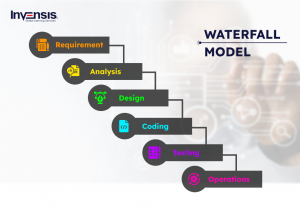
The waterfall model uses a sequential approach to building any software. Below are the phases of the waterfall model:
- In this phase, you try to analyze the requirements given by the clients
- In the Design phase, the analysis will be transformed into an ordered structure, i.e., you prepare a blueprint of the software
- After completing the design phase, it’s time for developers to get their hands dirty by coding for the application. This would be the source code, and you test it in the testing process. Different checks on the application are performed, such as unit testing, integration testing, performance testing, etc.
- In the Deployment phase, the tested application is deployed on production servers
- Finally comes the Monitoring phase, wherein 60 percent of the entire effort is spent monitoring the application’s performance
Let’s see its advantages and disadvantages
Advantages of Waterfall Model:
- Easy to use and simple to understand
- As it’s a top-down approach process, overlapping of the phases is avoided
- Suitable for small-projects
- Easy testing and analysis
Disadvantages of Waterfall Model:
- Changes to the product are complicated to draw while it is in the testing stage
- Not suitable for complex projects
- The end product is only available at the end of the cycle
To summarize, the Waterfall model was only acceptable for projects with stable specifications. By stable, I mean that over time, requirements will not change. But this is improbable in today’s world, as specifications keep changing continuously.
Examples:
Applications such as CRM (Customer Relationship Management), HRM (Human Resource Management), Supply Chain Management Framework and Retail Chains, etc., uses the Waterfall model.
Agile Model
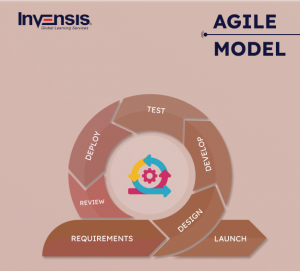
This model effectively splits the product into smaller divisions and ultimately incorporates them for testing, along with focusing on incorporating small changes, customer feedback, etc. Each iteration has analysis, design, implementation, and testing phases similar to the waterfall model.
Let’s see its advantages and disadvantages.
Advantages of Agile Model:
- There is a constant commitment to technical quality and successful designs
- Enables direct contact between individuals involved in the software project
- Suitable for large projects
- Easy to manage with a minimum number of resources
Disadvantages of Agile Model:
- High maintainability risk
- Time-consuming because customers, developers, and testers must constantly interact and should agree on each other’s decision
- Difficult to predict the time of the end product
There was a lack of coordination in Agile methodology between developers and operation engineers, which slowed down the development phase and updates. Tech companies have started understanding the need for better team coordination and quicker software delivery.
Examples:
Scrum, Extreme Programming (XP), Feature Driven Development (FDD), Dynamic Systems Development Method (DSDM), Adaptive Software Development (ASD), Crystal, and Lean Software Development are the most popular and common applications of Agile Methodology.
DevOps was introduced then to overcome this problem. DevOps allows continuous software delivery with less complex issues to address and solve problems quicker.
So far, we understand what DevOps is and its history. In the next section, we will discuss ‘why is DevOps important?’ We will also discuss DevOps principles in detail later in this article.
Why is DevOps Important?
The rise of DevOps isn’t just about faster software delivery; it’s about building better businesses.
In a world where speed, reliability, and customer experience define market leaders, DevOps helps organizations shorten delivery cycles, reduce errors, and respond to change faster than ever before.
Here’s why DevOps has become essential for modern enterprises:
Increased Development Efficiency
With DevOps, software engineers don’t have to spend time on things that can be done automatically. Because of this, manual work is kept to a minimum. Parallel workflows, acceleration tools, scalable infrastructure, continuous integration servers, and other things also help make sure that development and deployment are done quickly and effectively.
Better Customer Satisfaction and Experience
The primary reason for implementing DevOps in business is to provide high-quality services to customers or end-users more quickly. Driving benefits around excellent customer experience and increased revenue is the best way to stay ahead of the competition. Many factors contribute to agility and efficiency, but deepening customer engagement is what matters at the end of the day.
Customers today expect a better experience across all digital platforms and brand touchpoints. Issues can be identified earlier in the development pipeline by focusing on collaboration between different teams and introducing multiple feedback loops. As a result, time spent troubleshooting is reduced, and the customer experience improves.
Wider Reliability
Development, deployment, and other processes become more dependable and error-free. The team can quickly identify any inconsistencies or problems in the program thanks to DevOps and continuous testing, which ensure faster development cycles. Because of good communication and experience sharing, it is simple to address issues quickly. It’s also very easy to undo a deployment at any time.
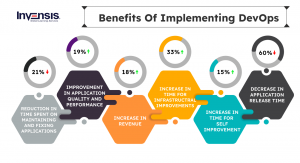
Increased Data ROI
One key aspect is the financial benefits of DevOps. It makes it easy for businesses to turn data into money quickly. A business that is automated and flexible can also help people see the value of data. Businesses save time and money when DevOps utilities run Big Data tools. It is possible to quickly recoup costs and reduce response time by a huge amount, increasing profitability.
Reduced Time to Market
One of the primary reasons DevOps is important for your business is that it allows you to deliver software more quickly due to streamlined processes, proper automation and systematic release planning. A shorter time to market means you have a better chance of outrunning your competitors.
Reduced Deployment Failures and a Shorter Recovery Time
Programming errors cause the majority of development failures. As a result, having a DevOps team will enable more releases in shorter spawns. This makes finding potential bugs in the code easier and more likely. For the same reason, and if a problem does arise, recovery will be accelerated due to the knowledge and participation of all members throughout the development process.
What are DevOps Principles?
With a DevOps culture, developers get closer to the user because they better understand their requirements and needs. Operations teams participate in the development process and add customer needs and maintenance requirements. It means following the following key principles, which help DevOps teams deliver applications and services faster and better than organizations that use the traditional software development model.
Establish a Collaborative Environment
 DevOps brings together development and operations teams, implying a collaborative environment, a unified team pursuing common goals. As a result, teams are encouraged to communicate, brainstorm, share ideas, and solve problems. Also, this collaboration needs to start at the top and work its way down, starting with support from the executives.
Automation
DevOps requires automating as much of the software development lifecycle as possible. This provides developers with more time to write code and create new features. Automation is an important component of a CI/CD pipeline because it reduces human errors and increases team productivity. Teams can achieve continuous improvement with short iteration times when they use automated processes, allowing them to respond quickly to customer feedback.
NOTE: The process of delivering software is made easier by a CI/CD pipeline. It helps you build code, run tests, and safely release a new software version. It also cuts down on mistakes made by hand, gives developers feedback, and lets them make changes to the product quickly.
|
“The most powerful tool we have as developers is automation.” |
 |
Continuous Improvement
Continuous improvement became ingrained in agile practices, lean manufacturing, and improvement Kata. It emphasizes experimentation while minimizing waste and streamlining for speed, cost, and ease of delivery. Continuous delivery is also linked to continuous improvement, allowing DevOps teams to push updates that improve software system efficiency. With a constant pipeline of new releases, teams can consistently push code changes that reduce waste, improve development efficiency, and provide more value to customers.
Customer-focused Action

DevOps teams develop products and services based on short feedback loops with customers and end users. DevOps practices enable faster collection and response to user feedback through real-time live monitoring and rapid deployment. As a result, teams gain immediate visibility into how live users interact with a software system and can use that knowledge to develop additional improvements.
Create with an End Goal in Mind

This principle entails understanding the needs of customers and developing products or services that solve real-world problems. Teams should not “build in a bubble” or develop software based on assumptions about how customers will use it. DevOps teams, on the other hand, should comprehensively understand the product from conception to implementation.
How DevOps Works?
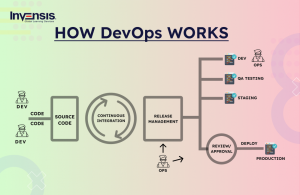
DevOps changes how teams build and deliver software, from hand-offs to handshakes.
Instead of developers writing code in isolation and passing it to operations later, both teams now work together through the entire lifecycle, from planning to monitoring.
Here’s how it plays out in real projects:
1. Shared Responsibility
In a DevOps model, development, operations, testing, and even security teams work as one cross-functional unit. Everyone shares ownership of the product’s quality, uptime, and performance. This eliminates the “it’s not my problem” mindset that often slows teams down.
2. Automation at Every Step
Automation keeps the pipeline moving smoothly. Tasks such as code integration, testing, and deployment are handled by tools like Jenkins, GitLab CI/CD, or CircleCI. This not only speeds up delivery but also ensures each release is consistent and error-free.
3. Continuous Integration and Delivery (CI/CD)
The CI/CD pipeline is where DevOps really shines. Developers continuously merge code into a shared repository, and automated tests verify it right away. When it passes, the code is packaged and deployed automatically to staging or production environments, often multiple times a day.
4. Integrated Security – DevSecOps
Modern DevOps brings security into every stage, creating what’s known as DevSecOps. Instead of testing security at the end, teams build it into the development process through automated scans, policy checks, and secure coding practices.
5. Monitoring and Feedback
Once deployed, the software is continuously monitored using tools like Prometheus, Datadog, or Splunk. Real-time performance data and customer feedback help teams identify bottlenecks and release improvements faster.
DevOps works because it turns software delivery into a living system, one where automation, collaboration, and feedback keep the cycle running continuously and intelligently.
DevOps Lifecycle
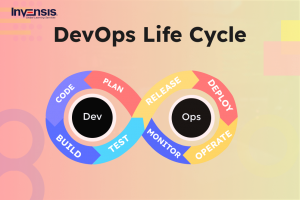
The DevOps lifecycle is a set of automated development processes or workflows within an iterative development lifecycle. It includes continuous software development, integration, testing, deployment, and monitoring phases. The DevOps strategy promotes continuous innovation, agility, and scalability to create, test, consume, and evolve software products. It encourages experimentation, feedback, and continuous learning to improve goods, services, and processes. Developers must be completely aware of all steps of the DevOps lifecycle to produce faster outcomes. Let’s take a quick look at how the DevOps lifecycle works at each stage.
Plan
At this stage, teams identify business requirements and gather feedback from end users. They develop a project roadmap to maximize business value and deliver the apt product during this stage.
Code
The code development takes place during this stage. To avoid security flaws and poor coding practices, development teams use tools and plugins such as Git to streamline the development process.
Build
Once developers finish their tasks, they use tools like Maven and Gradle to add the code to the shared code repository.
Test
Once the build is complete, it is deployed to the test environment to perform various types of testing, such as user acceptance testing, security testing, integration testing, performance testing, and so on, using tools such as JUnit, Selenium, and so on, to ensure software quality.
Release
In this stage, the build is ready to be used in the production environment. Once the build passes all the tests, the operations team schedules the releases or sends multiple releases to production, depending on what the organization needs.
Deploy
At this stage, Infrastructure-as-Code assists in creating the production environment and then releases the build using various tools.
Operate
The release is now available for customers to use. At this stage, the operations team is in charge of server configuration and provisioning via tools such as Chef.
Monitor
At this stage, the DevOps pipeline is monitored using data gathered from customer behavior, application performance, and other sources. Monitoring the entire environment assists teams in identifying bottlenecks affecting the productivity of the development and operations teams.
Phases of DevOps Lifecycle
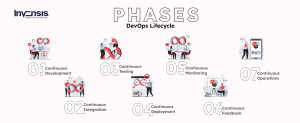
Everything in DevOps, from strategy to maintenance, is ongoing, as we previously stated. Let us now divide the entire lifespan into seven stages, with stability as the focal point. Every phase of the DevOps lifecycle can be repeated several times throughout the program until it is completed. The goal is to create an environment where code can move quickly while maintaining high-quality levels.
Continuous Development
Continuous development involves both software planning and coding. Here, the entire development process is divided into smaller development cycles. This procedure facilitates the DevOps team’s ability to accelerate the overall software development process. Furthermore, this phase is instrumental in mapping the vision for the development cycle, enabling developers to comprehend project expectations fully. As a result, the team begins to visualize its ultimate goal.
Continuous Integration
Continuous integration is the most important stage of the DevOps lifecycle. During this phase, updated code or add-on functionalities and features are developed and integrated into existing code. Furthermore, bugs in the code are detected and identified during this phase at each step through unit testing, and the source code is modified accordingly. This step transforms integration into a continuous process in which code is tested at each commit. Furthermore, the necessary tests are planned during this phase.
Continuous Testing
During the testing phases of the DevOps process, the DevOps team checks for bugs, errors, configuration, UX/UI issues, and other issues. Software testing is classified into components like unit testing and system integration testing.
QA teams test to ensure that all software components function as your DevOps team and end users intend. The best continuous testing tools for automating the phase include Selenium, Ranorex, Test.ai, TestSigma, TestNG, and JUnit. The software code is ready for production after passing this phase. If this is not the case, a good CI tool (Continuous Integration Tool) will usually notify the programmer who iterated the code to fix the problem (regression automation).
Continuous Deployment
This is the most important and active phase of the DevOps lifecycle, in which the final code is deployed on production servers. The continuous deployment includes configuration management to ensure that code is deployed accurately and smoothly on servers. Development teams deploy code to servers and schedule server updates, ensuring that configurations remain consistent throughout the production process. Containerization tools also aid deployment by ensuring consistency between development, testing, production, and staging environments. This practice allowed for the continuous delivery of new characteristics in production.
Continuous Monitoring
During this phase, the application’s functionality and attributes are continuously monitored to detect system errors such as low memory, a non-reachable server, etc. This procedure helps the IT team quickly identify app performance issues and their underlying cause. If IT teams discover a critical issue, the application is re-run through the DevOps cycle to find a solution. During this phase, however, security issues can be detected and resolved automatically.
Continuous Feedback
All stakeholders provide feedback to help improve the product during the continuous feedback DevOps phase. The DevOps methodology differs from traditional software development methodologies in that it involves many stakeholders, including the client, product team, development, cloud operations, finance, and management.
The phase collects data from software running and being monitored in live production with real users. Continuous feedback is provided, and all parties actively discuss ways to improve the product.
Continuous Operations
The last stage of the DevOps lifecycle is the shortest and most straightforward. Continuity, on the other hand, is at the heart of all DevOps operations that help automate release processes, allowing developers to detect issues faster and build better software product versions. Furthermore, persistence is essential for eliminating diversions and other extra steps that impede development.
Continuous operations have shorter development cycles, allowing organizations to advertise constantly and reduce the overall time to market the product. Moreover, DevOps makes software products more valuable by making them better and more efficient, attracting new customers.
DevOps Tools
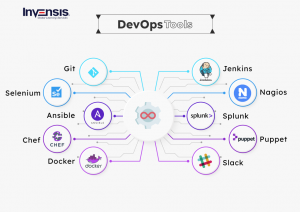
DevOps tools assist businesses in solving some of the challenges associated with implementing DevOps practices. However, there is no “one-size-fits-all” solution available. As a result, there is a wide variety of DevOps tools to meet every requirement.
1. Git
Git is an open-source distributed version control system that anyone DevOps engineer can use. It is designed to manage minor to major projects quickly and efficiently. It was created to help programmers coordinate their efforts. The version control lets you track and work with your team members in the same workspace. It serves as an important distributed version control system for the DevOps tool.
2. Selenium
Selenium is a popular open-source web application testing framework that works with all major browsers and platforms, such as Linux, Windows, and macOS. In addition, selenium integrates with many programming languages, including Python, C#, Ruby, Java, JavaScript, PHP, PERL, and other automation test frameworks.
3. Ansible
Ansible is an open-source platform that offers one of the easiest ways to automate the IT infrastructure and applications, such as network setup, cloud deployment, and development environment design.
4. Chef
Chef is a powerful automation tool for configuration management that allows you to convert infrastructure into code. It is used in infrastructure automation and aids in reducing manual and repetitive activities for infrastructure management.
5. Docker
A lightweight tool that uses containers to bundle an application before shipping the entire container as one package with all the specifications and dependencies. The Docker engine is intended to automate containerized applications’ development, deployment, and management on single nodes. It is open-source and works with cloud services such as AWS, Google Cloud Platform, and Azure Cloud. Docker is also available for Windows and Linux.
6. Jenkins
Jenkins is a Java-written continuous integration server. You can use it in near real-time for testing and monitoring changes. As a developer, this will help you easily identify and fix bugs in your code and automate their development testing.
7. Splunk
Splunk is a software platform for searching, analyzing, and visualizing machine-generated data or logs collected from websites, apps, sensors, computers, etc., that comprise the IT and business infrastructure. It helps firms to be more secure, productive, and competitive.
8. Nagios
Nagios is a robust monitoring system for systems, networks, and infrastructure. It is free to use and download because it is open-source software. Nagios is highly scalable and can be used to monitor both small and large enterprise networks. It has many characteristics that allow you to monitor your IT infrastructure. Nagios is also highly extensible and can be integrated with various other tools and systems.
9. Puppet
Puppet is an open-source system configuration, deployment, and server management DevOps tool that employs declarative programming. It is organized into reusable modules for quick setup of pre-configured servers and is compatible with most portals. Like Chef, it also uses IAC, adopts a master-slave structure, and features an intuitive user interface to ease real-time reporting, node management, and several other tasks.
10. Slack
Slack is a simple application with an intuitive user interface and many pre-built integration points, making it an excellent supplement to over 900 other business tools. It can be accessed via a web browser, synchronized with your desktop, and used on mobile devices such as tablets and smartphones. Slack also provides plenty of storage space and a diverse set of integrations (paid versions).
DevOps Culture
While DevOps practices use technology to automate and optimize processes, it all starts with the culture within the organization—and the people who contribute to it. The challenge of fostering a DevOps culture necessitates significant changes in how people work and collaborate. However, when organizations commit to a DevOps culture, they can foster the development of high-performing teams.
Collaboration, Transparency, and Alignment

Collaboration between teams, which begins with visibility, is one of the hallmarks of a healthy DevOps culture. Different teams, such as development and IT operations, must share their DevOps processes, priorities, and concerns. These teams must also plan their work together and agree on business goals and success measures.
Shifts in Scope and Accountability

As teams become more aligned, they take ownership and become involved in lifecycle phases other than the ones central to their roles. Developers, for example, are held accountable for the innovation and quality established during the development phase, as well as the performance and stability their changes bring during the operation phase. Simultaneously, IT managers must ensure that governance, security, and compliance are included in the planning and development phases.
Shorter Release Cycles

By releasing software in short cycles, DevOps teams remain agile. Because incremental progress has a lower impact on system stability, shorter release cycles facilitate planning and risk management. Shortening the release cycle also allows organizations to respond to changing customer needs and competitive pressures.
Continuous Learning

High-performing DevOps teams establish a growth mindset. They fail quickly and incorporate lessons learned into their processes, constantly improving, increasing customer satisfaction, and speeding up innovation and market adaptability. However, because DevOps is a journey, there is always room for improvement.
DevOps Best Practices
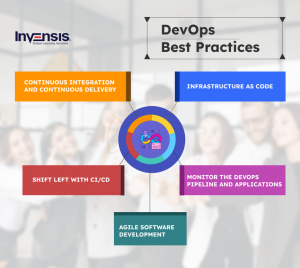
Teams bring DevOps to life by using certain practices throughout the application lifecycle. This is in addition to setting up a DevOps culture. These practices aid in accelerating, automating, and improving a specific phase. Others span multiple phases, assisting teams in creating seamless processes that boost productivity.
Continuous Integration and Continuous Delivery
Since the inception of DevOps, there has been a great deal of interest in the CI/CD pipeline, which is the foundation of the concept. In a nutshell, continuous integration is a DevOps-style practice in which software developers regularly merge source code into a centralized repository. The CI pipeline will initiate build and test operations on every repository merge.
The continuous delivery pipeline typically allows teams to deploy software releases on test, stage, or production environments as soon as the CI pipeline produces a successful build. This also enables developers and quality assurance engineers to perform extensive testing and upgrades, identifying flaws or concerns ahead of time.
Agile Software Development
Agile is a software development method that emphasizes teamwork, customer and user feedback, and high adaptability to change via short release cycles. The Agile teams provide continuous changes and improvements to customers, collect feedback, and then learn and adjust based on customer requirements and needs. As a result, agile differs significantly from traditional frameworks, such as waterfall, which features lengthy release cycles defined by sequential phases. Kanban and Scrum are two well-known Agile frameworks.
Infrastructure as Code
Infrastructure as code is a way of setting up and managing infrastructure using code and software development techniques, like version control and continuous integration. The API-driven model of the cloud lets developers and system administrators interact with infrastructure programmatically and at scale instead of setting up and configuring resources by hand. So, engineers can use code-based tools to talk to infrastructure and treat infrastructure the same way they treat application code. Infrastructure and servers can also be set up quickly using standard patterns, updated with the updated patches and versions, or duplicated in ways that can be done repeatedly.
Shift Left with CI/CD
When teams “shift left,” they incorporate testing into their code development processes as early as possible. Rather than sending various changes to a separate test or QA team, various tests are carried out throughout the coding process to allow developers to fix bugs or improve code quality. They are both working on the relevant section of the codebase at the same time. The ability to shift left is based on continuous integration, continuous delivery, and deployment, or CI/CD and deployment.
Monitor the DevOps Pipeline and Applications
It’s critical to keep an eye on the DevOps pipeline so that a broken build or failed test doesn’t cause unnecessary delays. For example, automation accelerates development, but if an automated process fails and no one knows, you’re better off doing the work manually. Similarly, it is critical to monitor production applications to detect failures or performance deficiencies before your customers do.
Case Studies of DevOps
1. NASA
Problem Statement: For greater agility and cost savings, NASA shifted almost 65 applications from a conventional hardware-based data center to a cloud-based environment. Managing multiple virtual private clouds (VPCs) and AWS accounts was Burdensome.
Solution: This issue was solved by using Ansible Tower to control and schedule the cloud climate.
Impact:
- Stacking applications from 1-2 hours to less than 10 minutes per stack.
- Real-time disk and RAM monitoring was achieved
- The time required to update nasa.gov has been reduced from 1 hour to 5 minutes
2. HP
Problem Statement: In 2006, developers spent around 5% of their time building different products such as printers, scanners, etc., and the rest on planning, integration, and testing.
Solution: To overcome that, HP incorporated the Continuous Integration/Continuous Deployment pipeline, which solved their problem.
Impact:
- Reduced the manual test time of 6 weeks, improving product quality and timely reviews
- HP uses a “Stop line” tool that alerts developers when code breaks any builds or unit tests
DevOps Certifications
Here are some of the most recognized DevOps certifications that help professionals advance their careers and organizations strengthen their teams:
- DevOps Foundation Certification – Ideal for beginners looking to understand DevOps concepts, culture, and principles.
- DevOps Professional Certification – Focuses on implementing CI/CD, automation, and continuous testing at scale.
- DevOps Master Certification – Designed for experienced professionals who lead DevOps transformations across teams or enterprises.
- Certified Kubernetes Administrator (CKA) – Perfect for engineers managing containerized applications in modern DevOps environments.
- AWS Certified DevOps Engineer – Professional – Recognized globally for mastering DevOps automation and CI/CD in the AWS ecosystem.
Career Opportunities After DevOps Certification
After completing a recognized certification, professionals often pursue roles such as:
- DevOps Engineer
- Cloud Infrastructure Architect
- Release Manager
- Site Reliability Engineer (SRE)
- Automation Specialist
- DevOps Consultant
With the right blend of certification and hands-on experience, you’ll be equipped to lead projects that deliver faster releases, stronger collaboration, and measurable business impact.
Ready to grow your DevOps career?
Explore globally recognized DevOps Certification Courses by Invensis Learning, designed and delivered by industry experts to help you master the tools, principles, and real-world applications that define modern DevOps.
Conclusion
DevOps isn’t just a buzzword; it’s how modern teams deliver faster, smarter, and more reliable software.
By blending development and operations into one culture of collaboration, automation, and continuous feedback, DevOps helps organizations break silos and build systems that learn and improve with every release.
From startups to global enterprises, DevOps has become the backbone of digital transformation, enabling teams to innovate faster, reduce downtime, and respond instantly to customer needs.
Understanding the DevOps lifecycle, mastering the right DevOps tools, and nurturing a continuous-improvement mindset are now must-haves for every IT professional.
If you’re looking to build a future-ready career in technology, getting certified in DevOps is one of the smartest moves you can make.
Through structured learning and hands-on training, certifications validate your ability to drive real-world DevOps success, from automation pipelines to cloud scalability.