
Imagine walking into a team room and instantly understanding the status of every task, identifying bottlenecks at a glance, and seeing exactly what each team member is working on, all without attending a single meeting or reading through lengthy status reports. This is the power of a Scrum board, the visual heartbeat of Agile teams worldwide.
In today’s fast-paced development environments where transparency, collaboration, and rapid adaptation define success, Scrum boards have become indispensable tools for high-performing teams. Whether you’re a project manager transitioning to Agile, a developer joining your first Scrum team, or a business leader seeking to understand how Agile teams operate, mastering Scrum boards is essential for navigating modern project management.
The statistics tell a compelling story about Agile’s effectiveness. Organizations implementing Scrum report 75.4% project success rates, compared with industry averages; 93% report higher customer satisfaction, and 59% report improved team collaboration. At the center of these improvements sits a deceptively simple tool: the Scrum board.
But what exactly is a Scrum board? How does it work within the broader Scrum framework? And most importantly, how can you create and use one effectively to transform your team’s productivity and collaboration?
In this comprehensive guide, we’ll demystify Scrum boards by exploring their core purpose, examining how they differ from similar tools such as Kanban boards, and providing step-by-step guidance on creating and optimizing your own Scrum board. Whether you’re using physical boards with sticky notes or digital platforms like Jira, you’ll gain practical insights to leverage Scrum boards for maximum team effectiveness.
Table of Contents:
- What Is a Scrum Board?
- Scrum Board vs. Kanban Board: Key Differences
- Key Elements of an Effective Scrum Board
- How to Create Your First Scrum Board: Step-by-Step Guide
- Best Practices for Using Scrum Boards Effectively
- Popular Scrum Board Tools for 2026
- Conclusion
- Frequenly Asked Questions
What Is a Scrum Board?
A Scrum board is a visual project management tool used by Scrum teams to track work progress during a sprint, a time-boxed iteration typically lasting 1-4 weeks. At its essence, the Scrum board provides a real-time, at-a-glance view of all tasks within the current sprint, their status, and who’s working on them. Think of it as a physical or digital dashboard that makes invisible work visible, transforming abstract project plans into tangible, trackable items.
The Purpose and Core Function
Scrum boards serve three fundamental purposes within the Scrum framework:
- Visualization of Work: The board transforms the sprint backlog, a list of committed work items, into a visual representation where each task appears as a card or sticky note. This visualization makes it immediately obvious what work exists, what’s in progress, and what’s completed. The human brain processes visual information 60,000 times faster than text, making visual boards far more effective than spreadsheets or written reports for understanding project status.
- Transparency and Communication: Scrum emphasizes transparency as one of its three pillars (alongside inspection and adaptation). The Scrum board creates radical transparency by making all work, progress, and obstacles visible to the entire team and stakeholders. Everyone shares the same information without filtering through managers or intermediaries. This transparency eliminates information hoarding, reduces status meeting overhead, and enables faster decision-making.
- Collaboration and Self-Organization: Rather than managers assigning tasks, Scrum teams self-organize around the board. Team members pull work based on priority and capacity, coordinate dependencies by seeing each other’s work, and identify opportunities to collaborate or assist teammates facing obstacles. The board serves as the focal point for daily stand-up meetings, where teams synchronize activities and adapt plans.
Core Components of a Scrum Board
While variations exist, most Scrum boards share common structural elements:
- Columns Representing Workflow Stages: The simplest Scrum boards use three columns, To Do, In Progress, and Done, to represent the basic states of work. More sophisticated boards might include additional columns, such as Ready for Testing, In Review, or Blocked, to reflect the team’s workflow. Each column represents a stage in transforming backlog items into completed functionality.
- Cards or Sticky Notes Representing Tasks: Each work item is represented by a physical or digital card that includes key information: task description, assigned person, story points or estimated effort, acceptance criteria, and any relevant technical notes. As work progresses, team members physically move cards (or update them digitally) from column to column, creating a visible flow of work across the board.
- Swim Lanes (Optional): Many teams add horizontal lanes to organize cards by user story, team member, priority level, or work type. For example, a board might have separate swim lanes for new features, bug fixes, and technical debt, allowing teams to visualize how effort is distributed across different work categories.
- Sprint Information: The board typically displays the sprint goal, sprint duration, remaining days, and, optionally, a burndown chart showing remaining work over time. This context helps teams gauge whether they’re on track to complete committed work.
Scrum Board vs. Kanban Board: Key Differences
While Scrum boards and Kanban boards look visually similar, both use columns and cards to represent work; they serve different purposes within distinct Agile frameworks. Understanding these differences helps teams choose the right tool for their context.
Fundamental Philosophical Differences
- Time-Boxing vs. Continuous Flow: Scrum boards operate within fixed-duration sprints. At sprint planning, the team commits to specific work, and the board represents only that sprint’s tasks. When the sprint ends, the board resets with new work for the next sprint. Kanban boards, conversely, represent continuous flow with no time boundaries. Work moves continuously across the board, with no sprint boundaries or resets.
- Sprint Commitment vs. Flexible Priorities: Scrum teams commit to delivering specific work during sprint planning and generally avoid adding new items mid-sprint (unless critical issues arise). The Scrum board reflects this commitment, what you see is what the team pledged to complete. Kanban boards allow priorities to change at any time; new high-priority work can move to the front of the queue, and teams pull the next most important item whenever capacity is available.
- Prescribed vs. Flexible Roles: Scrum defines three specific roles, Product Owner (defines priorities), Scrum Master (facilitates process), and Development Team (delivers work), that interact with the Scrum board in prescribed ways. Kanban prescribes no specific roles; existing job titles and organizational structures remain unchanged, with teams adapting Kanban practices to their current situation.
Practical Operational Differences
Board Lifecycle: Scrum boards have a clear lifecycle tied to sprints, they’re created during sprint planning, actively used throughout the sprint, and cleared at sprint end during sprint review. Kanban boards are persistent and continuous, evolving gradually without reset points.
Work-in-Progress (WIP) Limits: While some Scrum teams impose WIP limits, it’s not inherent to Scrum. Kanban boards mandate WIP limits for each column, preventing teams from starting too many tasks simultaneously and forcing focus on completing work before starting new items. These limits are visible on the board (e.g., “In Progress: 3/5” indicating 3 items with a maximum of 5).
Metrics and Measurement: Scrum boards track velocity (story points completed per sprint) and burndown charts (remaining work versus time within a sprint). These metrics help teams forecast capacity and plan future sprints. Kanban boards focus on cycle time (time from start to finish for individual items) and throughput (items completed per time period), enabling continuous flow optimization.
Scrum Board vs. Kanban Board: Side-by-Side Comparison
| Aspect | Scrum Board | Kanban Board |
| Time Structure | Sprint-based (1-4 weeks) | Continuous flow (no sprints) |
| Board Lifecycle | Resets each sprint | Persistent and continuous |
| Work Commitment | Sprint planning commitment | Pull items as capacity allows |
| Priority Changes | Minimized during sprint | Can change anytime |
| WIP Limits | Optional | Mandatory per column |
| Roles | Product Owner, Scrum Master, Dev Team | Flexible (no prescribed roles) |
| Best For | Projects with defined iterations | Continuous support/maintenance work |
| Metrics | Velocity, burndown charts | Cycle time, throughput |
| Ceremonies | Sprint planning, review, retrospective, daily standup | Optional (flexible meetings) |
PRO TIP: Scrumban, The Best of Both Worlds
Don’t feel forced to choose exclusively between Scrum and Kanban. Many mature Agile teams use Scrumban, a hybrid combining Scrum’s sprint structure with Kanban’s flow-based approach. You can run sprints (Scrum) while implementing WIP limits and continuous flow (Kanban). This flexibility lets teams maintain sprint commitments and ceremonies while optimizing workflow efficiency. Start with pure Scrum or Kanban based on your context, then experiment with hybrid approaches as team maturity grows.
Key Elements of an Effective Scrum Board
Creating a Scrum board is straightforward: columns, cards, and work tracking. But creating an effective Scrum board that genuinely improves team productivity requires understanding and implementing key elements that transform a simple board into a powerful collaboration tool.
Clear, Meaningful Column Structure
The column structure should reflect your team’s actual workflow, not a theoretical ideal. While “To Do → In Progress → Done” works for simple processes, most teams benefit from more granular columns:
Development Workflow Example:
- Backlog: Sprint-committed work not yet started
- In Development: Actively being coded
- Code Review: Awaiting peer review
- In Testing: Being validated by QA
- Done: Meets the definition of done and potentially shippable
Column Design Principles: Limit columns to 5-7 maximum to avoid excessive complexity. Each column should represent a meaningful state change requiring different activities. Ensure clear entry and exit criteria; teams should know exactly when a card moves between columns. Avoid vague columns such as “Almost Done” that obscure the true work status.
Well-Defined Task Cards
Each card should contain sufficient information for team members to understand and execute the work without constantly seeking clarification:
Essential Card Information:
- Task Title: Clear, action-oriented description (e.g., “Implement user authentication API” not “API work”)
- Acceptance Criteria: Specific conditions that must be met for the task to be considered complete
- Story Points or Estimates: Relative size or effort estimate
- Assigned Person: Who’s currently working on this (though Scrum encourages collective ownership)
- Dependencies: Links to related cards or external dependencies
- Priority Indicators: Visual markers (colors, labels) showing relative importance
Definition of Done (DoD)
The Definition of Done establishes the quality standards every completed task must meet before moving to the Done column. Without clear DoD, “done” becomes subjective, leading to incomplete work, technical debt, and rework.
Sample Definition of Done:
- Code written and follows team coding standards
- Unit tests written and passing (minimum 80% coverage)
- Code reviewed and approved by at least one peer
- Integration tests passing
- Documentation updated (code comments, user guides if applicable)
- Acceptance criteria validated
- No known defects
- Deployed to the staging environment
Make your DoD visible on or near the board as a constant reminder of quality standards. Teams often discover their DoD needs refinement as they encounter edge cases, that’s healthy evolution.
Visual Management Principles
Effective Scrum boards leverage visual management principles that make information processing fast and intuitive:
- Color Coding: Use colors to convey information at a glance, red for blocked items, yellow for at-risk tasks, green for on-track work. Different colored cards might represent different work types (features vs. bugs vs. technical debt).
- Avatars or Initials: Place team member photos, avatars, or initials on cards they’re working on. This creates accountability and helps teammates know who to approach for coordination or assistance.
- Blocked Items Indicators: Make blocked work highly visible through red flags, warning symbols, or a dedicated “Blocked” column. Blocked work requires immediate attention to remove obstacles.
- Aging Indicators: Use visual cues (dots, hash marks, or digital aging features) to highlight cards sitting too long in one column. Long-dwelling cards often indicate problems requiring intervention.
How to Create Your First Scrum Board: Step-by-Step Guide
Whether you’re creating a physical board with sticky notes or a digital board using software, the fundamental process remains consistent. Follow these steps to build a Scrum board that drives team productivity from day one.
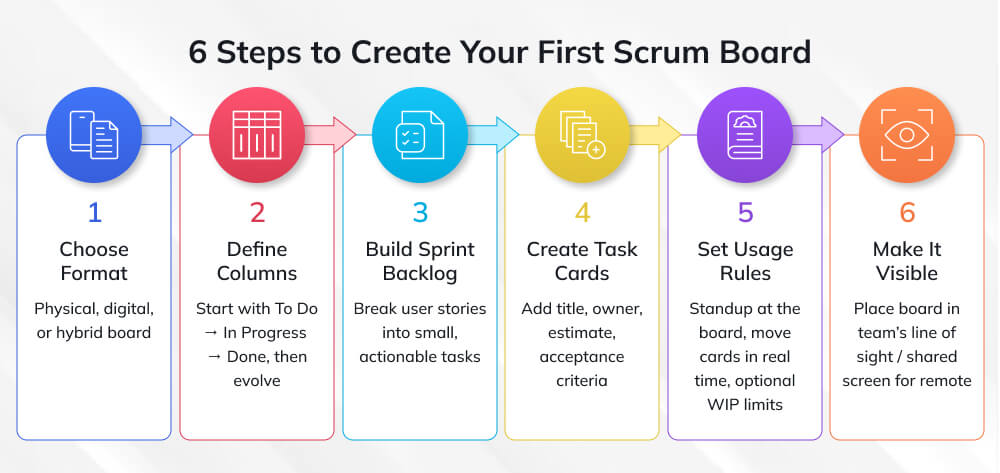
Step 1: Choose Your Board Format
Physical Boards: Use whiteboards, corkboards, or dedicated Scrum board frames with columns marked using tape or drawn lines. Represent tasks with colored sticky notes or index cards. Physical boards excel for co-located teams, offering tactile engagement and high visibility. They’re especially effective for teams new to Agile who benefit from the tangible, kinesthetic experience of moving physical cards.
Digital Boards: Use dedicated Scrum tools like Jira, Azure DevOps, Monday.com, Trello, or Asana. Digital boards work better for distributed teams, provide automatic tracking and metrics, enable easy reorganization, and integrate with other development tools. They’re essential for remote or hybrid teams but can feel less engaging than physical boards.
Hybrid Approach: Some teams maintain both, a prominent physical board in team spaces for visibility and engagement, with digital boards for distributed team members, reporting, and historical tracking.
Step 2: Define Your Columns
Start simple and evolve based on experience. For your first sprint, use basic columns:
- Sprint Backlog / To Do: Work committed for this sprint not yet started
- In Progress: Work currently being executed
- Done: Work completed meeting Definition of Done
After a few sprints, refine columns to match your team’s workflow. Common additions include:
- Ready for Development: Backlog items fully refined and ready to start
- In Review: Work awaiting peer review or approval
- Testing: Work being validated
- Blocked: Tasks with unresolved obstacles (alternative: use visual indicators on cards instead of dedicated column)
Step 3: Create the Sprint Backlog
During sprint planning, the Product Owner presents prioritized backlog items, and the team discusses, estimates, and commits to work they can complete within the sprint. Break down selected user stories into concrete tasks that become your initial Scrum board cards.
Task Breakdown Example:
User Story: “As a customer, I want to reset my password so I can regain account access”
Tasks:
- Design password reset user interface
- Implement reset token generation and email delivery
- Create password reset API endpoint
- Build password reset form
- Implement token validation and password update
- Write automated tests
- Update user documentation
Each task becomes a card in your Sprint Backlog column, ready for team members to pull as capacity allows.
Step 4: Populate Cards with Essential Information
Create cards (physical or digital) for each task containing:
- Clear, actionable title: What needs to be done
- Description: Additional context or technical notes
- Acceptance criteria: How to verify completion
- Estimate: Story points or hours
- Dependencies: Related tasks or external requirements
- Owner: Initially unassigned in self-organizing teams; assigned as work begins
Avoid over-documenting cards, include enough information for team autonomy but not so much that maintaining cards becomes burdensome.
Step 5: Establish Board Usage Rules
Define how your team will interact with the board:
Daily Standup Protocol: Conduct daily standups physically at the board (or screen-sharing for digital boards). Team members discuss cards they’re working on, progress made, and obstacles encountered while referencing the visual board.
Card Movement Rules: Establish who moves cards (person working on it, Scrum Master, or anyone noticing completed work). Define what triggers movement, does “Done” mean code complete or fully deployed?
WIP Limits (Optional): Consider limiting work-in-progress to encourage completion over starting. For example, “In Progress: maximum 2 cards per team member” or “In Review: maximum 5 cards total.”
Board Hygiene: Assign responsibility for keeping the board updated and organized. In physical boards, this might mean straightening cards and refreshing markers weekly. In digital boards, it means archiving completed sprints and ensuring descriptions stay current.
Step 6: Make the Board Highly Visible
Physical Boards: Place in high-traffic areas where the team naturally congregates. Ensure lighting is good and the board is large enough for legibility from several feet away. Consider a mobile board on wheels that can move to meeting spaces.
Digital Boards: Set as browser homepage or pinned tab for team members. Display on large monitors in team spaces. Ensure all stakeholders have view access without requiring special permissions or technical knowledge.
Accessibility: Everyone interacting with the project, team members, Product Owner, and stakeholders should access the board easily without barriers.
| AVOID THIS MISTAKE: Over-Complicating Your First Board
New Scrum teams often create elaborate boards with numerous columns, complex swim lanes, and excessive card details. This complexity creates maintenance overhead that discourages board usage. Teams spend more time managing the board than delivering work, and the board becomes a chore rather than a helpful tool. Why it’s problematic: Complex boards are intimidating for new team members, require constant explanation, slow down daily standups, and often contain information that nobody actually uses for decision-making. What to do instead: Start with the simplest possible board—three columns and basic card information. Use it for one full sprint. During the sprint retrospective, ask what additional information or columns would genuinely help the team. Evolve incrementally based on actual needs, not theoretical ideal states. Complexity should emerge from experience, not be designed up front. |
Best Practices for Using Scrum Boards Effectively
Creating a Scrum board is the first step; using it effectively to drive team performance requires ongoing discipline and continuous improvement.
Daily Stand-Up at the Board
Conduct daily stand-ups physically at the board or screen-sharing for remote teams. Rather than the traditional round-robin format where each person speaks in turn (often becoming status reports for the Scrum Master), walk the board from right to left, start with “Done,” move to “In Progress,” and finish with “To Do.”
Board-Centric Stand-Up Format:
- Done Column: Celebrate completed work, quickly verify it meets Definition of Done
- In Progress Column: For each card, the assigned person briefly shares progress and any obstacles. Team identifies if assistance is needed.
- Blocked Items: Address blocked cards immediately, can obstacles be removed today?
- To Do Column: Identify who will pull next work based on priorities and capacity
This format keeps focus on the work rather than individuals, encourages collaboration, and naturally limits meeting duration since you’re discussing concrete cards rather than abstract updates.
Keep the Board Current
Stale boards lose credibility and value. Establish rituals ensuring the board reflects reality:
- Real-Time Updates: Move cards the moment status changes, not during daily standups. If you finish code review, immediately move the card to Testing. This keeps the board truthful and enables anyone to check status anytime.
- Daily Board Grooming: Spend 5-10 minutes daily ensuring cards are current, updating descriptions, adding notes from discoveries, marking dependencies, or refining acceptance criteria as understanding evolves.
- Sprint Hygiene: At sprint end, clear the Done column (archiving completed work), move incomplete work back to the product backlog or forward to the next sprint, and reset the board for fresh sprint planning.
Leverage Visual Management
Maximize the board’s visual communication power through intentional design:
- Highlight Exceptions: Make problematic items highly visible, blocked cards get red flags, at-risk items get yellow indicators, and cards exceeding expected cycle time get aging markers. Exceptions should jump out visually, demanding attention.
- Cluster Related Work: Use swim lanes or spatial proximity to group related tasks. If three cards all contribute to the same user story, position them together so team members see the relationship and can coordinate efforts.
- Celebrate Progress: Create rituals around moving cards to Done, ring a bell, play a sound effect, or have team members sign completed cards before archiving them. These small celebrations reinforce positive momentum and accomplishment.
Balance Flexibility with Sprint Commitment
While Scrum emphasizes sprint commitment, reality sometimes requires adaptation:
- Scope Changes: If truly critical work emerges mid-sprint, the Product Owner and team can negotiate adding it, but something of equal size must be removed to maintain sustainable pace. Don’t just pile on work without acknowledging capacity limits.
- Stretch Goals: Some teams designate optional “stretch goal” cards that they’ll tackle if they complete committed work early. Mark these distinctly so their non-completion doesn’t feel like failure.
- Technical Debt Cards: Reserve capacity (often 10-20% of sprint) for addressing technical debt, refactoring, or other non-feature work that’s invisible to customers but essential for long-term velocity. Make these cards visible on the board so technical health doesn’t hide.
Popular Scrum Board Tools for 2026
While physical boards work wonderfully for co-located teams, most modern teams benefit from digital Scrum board tools that enable remote collaboration, provide automatic metrics, and integrate with development workflows.
Top Digital Scrum Board Platforms
- Jira: Industry-leading Agile tool with robust Scrum board features, customizable workflows, advanced reporting (velocity charts, burndown, cumulative flow), and deep integration with development tools (Git, CI/CD, testing frameworks). Best for technical teams requiring sophisticated customization.
- Azure DevOps: Microsoft’s comprehensive platform integrating Scrum boards with version control, CI/CD pipelines, and testing tools in a unified environment. Excellent for teams already using Microsoft ecosystems and those requiring enterprise-grade security.
- Monday.com: Highly visual, user-friendly platform with customizable Scrum templates, automation capabilities, and intuitive interface. Ideal for teams new to digital boards or those prioritizing ease of use over technical depth.
- Trello: Simple, card-based tool using boards, lists, and cards, lightweight and approachable for teams wanting basic Scrum board functionality without complexity. Great for small teams or those transitioning from physical boards.
- Asana: Project management platform with Scrum board views, timeline features, and strong portfolio management capabilities. Well-suited for organizations managing multiple Scrum teams simultaneously.
- Selecting the Right Tool: Consider team size, technical sophistication, integration needs, budget, and whether your team prefers simplicity (Trello, Monday.com) or advanced features (Jira, Azure DevOps). Most platforms offer free trials, test several with your actual sprint work before committing.
Conclusion
A Scrum board is more than a task tracker; it’s the visual engine of Scrum’s transparency, inspection, and adaptation. When work is visible, priorities are clear, and progress is obvious, teams collaborate better and spot issues earlier.
Don’t obsess over the “perfect” board. Start simple, use it consistently for a few sprints, and refine based on what your team actually struggles with: clarity, WIP, blocked items, or prioritization. The best Scrum boards are the ones that keep evolving through real-world use, not theory.
If you want to go beyond basic boards and actually run high-performing Scrum teams, consider Invensis Learning’s CertifiedScrum Master Certification Training / Agile Scrum Master course. It will help you design effective Scrum boards, run better ceremonies, and use Agile metrics to improve how your team delivers continuously.
Frequently Asked Questions
1. Can you use a Scrum board for non-software projects?
Absolutely! While Scrum originated in software development, Scrum boards work for any project involving iterative delivery and team collaboration. Marketing teams use Scrum boards for campaign development, content teams for editorial calendars, HR departments for recruitment initiatives, and even construction teams for renovation projects. The key is adapting the board to your specific workflow while maintaining Scrum principles. Any work that can be broken into tasks, organized by status, and completed within time-boxed iterations benefits from Scrum boards.
2. How many tasks should be on a Scrum board at once?
The ideal number depends on team size and sprint duration, but general guidelines help. For a two-week sprint with a 5-7 person team, expect 15-30 tasks (cards) on the board. Too few tasks suggest stories aren’t broken down sufficiently; too many creates overwhelming visual clutter. A useful rule of thumb: aim for 2-4 tasks per team member per week. If your board feels overcrowded, you’ve likely committed to too much work or need better task decomposition. Quality sprint planning prevents overloaded boards.
3. Should the Scrum board include bugs and technical debt?
Yes, absolutely. The Scrum board should reflect all work-consuming team capacity—features, bugs, technical debt, documentation, research spikes, and operational tasks. Hiding this work creates false impressions of velocity and prevents honest capacity planning. Use visual indicators (colored cards, labels, or swim lanes) to distinguish work types so stakeholders understand how effort is distributed. Many teams reserve 10-20% of sprint capacity specifically for technical debt and bug fixes, making these explicitly visible on the board.
4. What if team members work on multiple tasks simultaneously?
While multitasking is sometimes unavoidable, Scrum philosophy encourages focus, completing work before starting new items. Multiple cards per person usually indicates context switching that reduces overall productivity. Consider implementing work-in-progress (WIP) limits, for example, no more than 2 active cards per person. When someone completes work, they pull the next priority item rather than starting multiple items concurrently. This discipline increases completion rate and reduces cycle time. That said, waiting periods (code reviews, feedback) sometimes necessitate working on secondary tasks, use judgment.
5. How do you handle tasks that span multiple sprints?
Ideally, break large tasks into smaller chunks completable within one sprint. If a task genuinely requires multiple sprints, create parent-child relationships, a high-level “epic” card with child cards representing sprint-sized work portions. Each sprint’s board shows only that sprint’s portion. At sprint end, incomplete work returns to the product backlog for reprioritization rather than automatically rolling forward (which undermines sprint commitment). Frequent multi-sprint tasks often indicate inadequate story decomposition or scope creep, address root causes rather than accepting as normal.
6. Can you switch from a Kanban board to a Scrum board?
Yes, and many teams make this transition as their work evolves. If your continuous-flow Kanban work starts organizing naturally into iterations with clear deliverables, Scrum structure might better serve team needs. The transition involves: defining sprint duration, establishing sprint ceremonies (planning, review, retrospective), creating sprint backlogs from your Kanban queue, and resetting boards between sprints. Start with one pilot sprint using Scrum board format while maintaining your Kanban board as backup. Evaluate during retrospective whether sprint structure adds value. Some teams discover Scrumban (hybrid) works best.