Are you searching for a project management tool that balances comprehensive features with affordability? With hundreds of project management platforms flooding the market, choosing the right solution can feel overwhelming. According to recent industry data, 72% of organizations struggle to find project management software that meets all their requirements without breaking the budget. This is where Zoho Projects enters the conversation, positioned as a cost-effective yet feature-rich alternative to enterprise-level solutions.
Zoho Projects, developed by Zoho Corporation, a multinational technology company headquartered in Chennai, India, has steadily gained traction among small to medium-sized businesses seeking robust project management capabilities without the premium price tag. With a G2 rating of 4.3 out of 5 stars and a Capterra score of 4.5/5 based on thousands of user reviews, Zoho Projects has proven its value in real-world applications across diverse industries.
But is Zoho Projects the right fit for your team? Does it deliver on its promise of comprehensive project tracking, task management, and collaboration tools at a fraction of the cost of competitors like Monday.com or Asana? Now, PCMag named Zoho Projects one of their Editors’ Choice winners for growing teams, praising its accessible pricing and helpful array of features.
In this comprehensive 2026 review, we’ll dive deep into Zoho Projects’ features, explore its strengths and limitations, analyze its pricing structure, examine user feedback, and help you determine whether this cloud-based project management platform aligns with your team’s specific needs and workflows. Whether you’re a project manager evaluating options, a business owner seeking to improve team productivity, or an organization comparing project management solutions, this detailed analysis will provide the insights you need to make an informed decision.
Table of Contents:
- What is Zoho Projects? Platform Overview
- Zoho Projects Key Features: In-Depth Analysis
- Zoho Projects Pricing: Plans and Value Analysis
- Zoho Projects Pros: Key Advantages and Strengths
- Zoho Projects Cons: Limitations and Drawbacks
- Who Should Use Zoho Projects? Ideal User Profiles
- Zoho Projects vs. Competitors: How It Stacks Up
- User Reviews and Ratings: What Customers Say
- Getting Started with Zoho Projects: Implementation Tips
- Conclusion
What is Zoho Projects? Platform Overview
Zoho Projects is a cloud-based project management software designed to help teams plan, track, and collaborate on projects from inception to completion. As part of the broader Zoho ecosystem, which includes over 45 integrated business applications, Zoho Projects serves as a centralized hub for project planning, task management, time tracking, resource allocation, and team collaboration.
Core Purpose and Target Users
Zoho Projects primarily targets small to medium-sized businesses, freelancers, startups, and growing teams that require comprehensive project management capabilities without enterprise-level complexity or costs. The platform caters to diverse industries including information technology, marketing and advertising, consulting services, construction and engineering, creative agencies, and professional services firms.
Unlike some project management tools that focus on simplicity at the expense of functionality, Zoho Projects aims to provide depth and breadth of features while maintaining accessibility. This approach makes it particularly suitable for organizations that have outgrown basic task management tools but aren’t ready for, or don’t need, the complexity and expense of enterprise project portfolio management systems.
Key Capabilities at a Glance
Zoho Projects offers a comprehensive suite of project management capabilities including detailed task management with hierarchies and dependencies, interactive Gantt charts for project planning and visualization, time tracking with built-in timers and timesheets, resource utilization and workload management, issue and bug tracking systems, project templates and blueprint automation, collaborative document management, client portals for external stakeholder engagement, customizable dashboards and reporting, and mobile applications for iOS and Android.
The platform’s architecture supports managing multiple projects simultaneously, making it scalable for organizations juggling various initiatives across different teams and departments.
Zoho Projects Key Features: In-Depth Analysis
Understanding Zoho Projects’ feature set is essential for evaluating whether it meets your team’s specific requirements. Let’s explore the platform’s core capabilities in detail.
Task Management and Organization
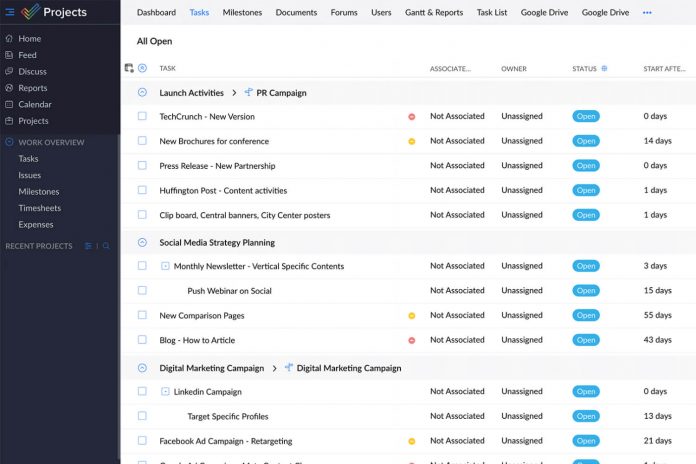
Zoho Projects excels in detailed task management, offering capabilities that go beyond basic to-do lists. Users can create complex task hierarchies with tasks, subtasks, and multiple levels of granularity, enabling teams to break down large projects into manageable components. Each task supports custom fields, priorities, labels, and tags for flexible organization.
Task dependencies ensure proper sequencing, while recurring tasks automate repetitive work. The platform allows assignment of multiple users to tasks, setting due dates with reminders, attaching files and documents directly to tasks, linking tasks across different projects, and tracking task progress through various status options.
One standout feature is the ability to create task templates that can be reused across projects, significantly reducing setup time for similar initiatives. Users consistently praise this granular approach to task management, noting it provides clarity and accountability that simpler tools lack.
Gantt Charts and Project Planning
Zoho Projects includes interactive Gantt charts that provide visual timeline representations of project schedules. Unlike static Gantt charts in some competing tools, Zoho’s implementation allows drag-and-drop adjustments to task timelines, automatic rescheduling when dependencies change, critical path visualization, baseline comparisons to track schedule variance, and milestone tracking for key deliverables.
The Gantt chart view updates in real-time as team members make changes, ensuring all stakeholders see the current project status. This dynamic approach to timeline management is particularly valuable for projects with complex interdependencies where schedule changes cascade through multiple tasks.
Time Tracking and Timesheets
Built-in time tracking capabilities enable precise monitoring of hours spent on tasks and projects. Team members can start and stop timers directly from task pages, manually enter time logs for completed work, submit timesheets for approval workflows, and track billable versus non-billable hours for client projects.
For consulting firms and agencies that bill clients based on time spent, this feature proves invaluable. The time tracking data integrates with reporting modules, providing insights into team productivity, project profitability, and resource utilization patterns.
Kanban Boards and Workflow Visualization
For teams preferring visual task management, Zoho Projects offers customizable Kanban boards. Users can create boards with custom columns matching their workflows, drag and drop tasks between stages, set work-in-progress (WIP) limits, and visualize bottlenecks and workflow efficiency.
The Kanban view is particularly popular with agile teams and those managing ongoing operations alongside project work. The flexibility to customize columns and workflows ensures the tool adapts to your processes rather than forcing you to adapt to rigid structures.
Collaboration and Communication Tools
Zoho Projects incorporates multiple collaboration features to keep teams aligned including project feeds for updates and discussions, document sharing and version control, built-in chat for real-time communication, @mentions to notify specific team members, and forums for organized topic-based discussions.
The platform also offers a client portal where external stakeholders can view project progress, provide feedback, and access relevant documents without needing full user accounts. This feature differentiates Zoho Projects from many competitors, as robust client engagement capabilities aren’t commonly found in similarly-priced tools.
Reporting and Analytics
Comprehensive reporting capabilities provide insights into project performance, team productivity, and resource utilization. Available reports include project status and progress reports, resource utilization charts, task reports with various filters, timesheet reports for billing and payroll, and custom reports with tailored parameters.
The visual dashboards consolidate key metrics, giving project managers and executives at-a-glance visibility into portfolio health. While some users note that report customization could be more flexible, the standard reports cover most common needs effectively.
Integration Capabilities
One of Zoho Projects’ significant strengths is its integration ecosystem. Native integrations with other Zoho applications create a seamless business management suite including Zoho CRM for sales pipeline visibility, Zoho Invoice for billing and payments, Zoho Desk for customer support ticket tracking, Zoho Analytics for advanced data analysis, and Zoho Books for financial management.
Third-party integrations extend functionality further, connecting with Google Workspace (Drive, Calendar, Contacts), Microsoft 365 and Teams, Slack for team communication, GitHub for code repository management, and Dropbox for file storage.
API access enables custom integrations for organizations with specific needs, making Zoho Projects highly adaptable to existing technology stacks.
Zoho Projects Pricing: Plans and Value Analysis
Understanding Zoho Projects’ pricing structure is crucial for evaluating its overall value proposition and determining which plan aligns with your budget and requirements.
Free Plan: Getting Started at No Cost
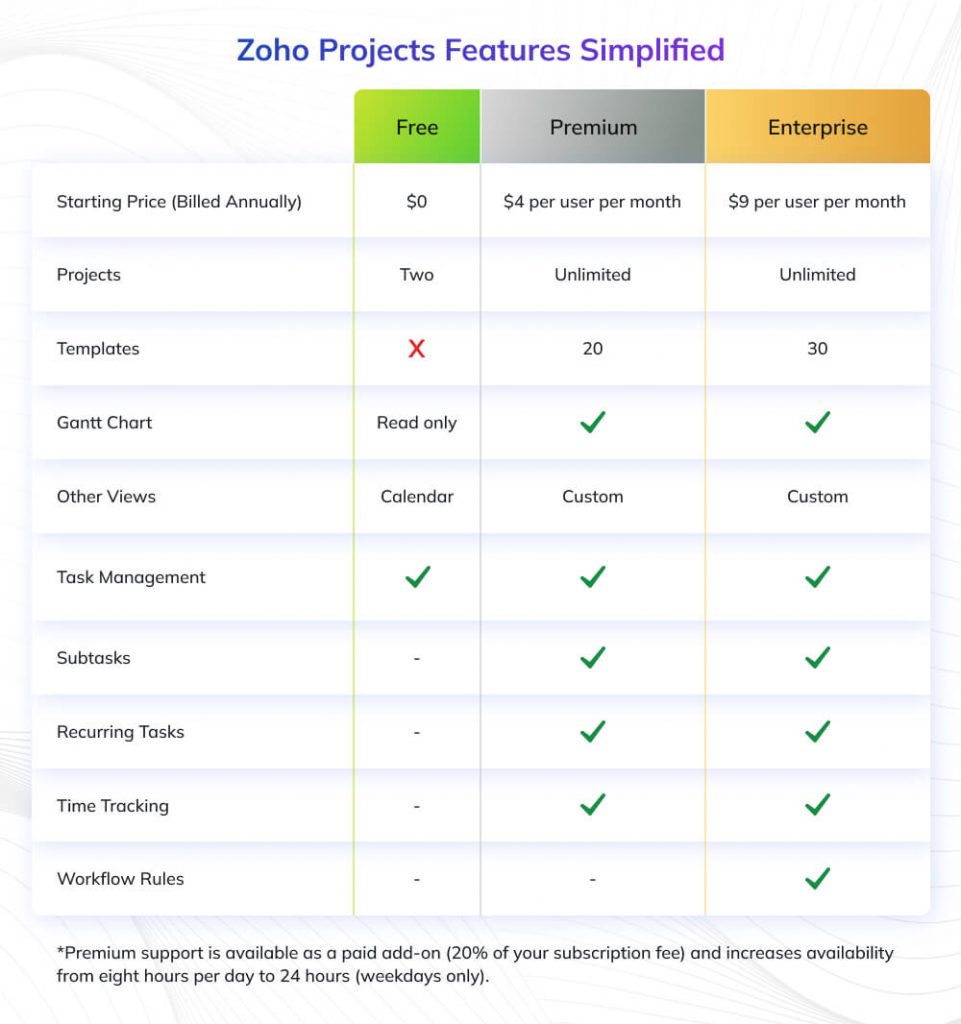
Zoho Projects offers a genuinely useful free tier, not just a limited trial, that includes basic task management and collaboration tools, support for up to 3 users, ability to manage 2 projects, 10 MB storage space, and essential features like task lists, Gantt charts, and time tracking.
This free plan is ideal for freelancers, very small teams, or organizations wanting to test Zoho Projects before committing financially. While limited in the number of users and projects, it provides enough functionality to manage simple projects effectively.
Premium Plan: $5 per User/Month
The Premium plan unlocks significantly more capability for $5 per user per month (billed annually) including unlimited users and projects, 100 GB storage space, task automation with workflows, custom fields and views, advanced reporting capabilities, integration with Zoho CRM and other apps, and subtask functionality.
At this price point, Zoho Projects is well below the average SMB project management software budget of $40 per user per month, making it exceptionally competitive. According to Capterra’s 2025 analysis, this premium plan represents one of the best value propositions in the project management software market for feature-to-cost ratio.
Enterprise Plan: $10 per User/Month
The Enterprise plan, at $10 per user per month (billed annually), adds advanced capabilities for larger organizations including custom roles and permissions, global Gantt chart across projects, portfolio dashboard for portfolio-level management, advanced workflow automation, inter-project dependencies, resource utilization charts, and priority support with faster response times.
This tier suits organizations managing complex project portfolios where cross-project visibility and advanced resource management become critical requirements.
Pricing Considerations and Hidden Costs
One of Zoho Projects’ advantages is transparent pricing with no hidden fees or surprise charges. However, consider these factors when budgeting: add-on costs for additional storage beyond plan limits, potential integration costs if connecting to non-Zoho third-party tools requires premium versions, training time investment for team adoption, and possible consulting fees if you need implementation assistance.
Compared to competitors, Zoho Projects’ pricing remains highly competitive. Asana’s Premium plan starts at $13.49 per user/month, Monday.com’s Standard plan begins at $12 per user/month, and Wrike’s Professional plan costs $9.80 per user/month, all higher than Zoho Projects’ comparable tiers.
Zoho Projects Pros: Key Advantages and Strengths
Every project management tool has strengths and weaknesses. Let’s examine where Zoho Projects truly excels based on user feedback, expert analysis, and hands-on testing.
1. Exceptional Value for Money
The most frequently cited advantage is Zoho Projects’ cost-effectiveness. Organizations consistently praise the platform’s ability to deliver enterprise-level features at small business prices. For teams transitioning from basic tools like Trello or Asana’s free tier, Zoho Projects offers significant feature expansion without straining the budget.
A marketing agency with 15 team members switching from Asana reported saving over $1,500 annually while gaining improved time tracking and client portal capabilities they previously lacked.
2. Comprehensive Feature Set
Unlike tools that excel in one area while lacking in others, Zoho Projects provides breadth across task management, time tracking, project planning, resource management, reporting, and collaboration. This completeness eliminates the need to cobble together multiple tools or purchase expensive add-ons.
Users appreciate having Gantt charts, Kanban boards, time tracking, and client portals all in one platform rather than switching between disconnected applications.
3. Strong Integration with Zoho Ecosystem
For organizations already using other Zoho applications, particularly Zoho CRM, Invoice, or Books, the seamless integration provides enormous value. Data flows automatically between systems, eliminating duplicate entry and ensuring consistency.
A consulting firm using Zoho CRM for sales and Zoho Projects for delivery noted that automatic project creation from closed deals and seamless time-to-invoice workflows improved their efficiency by an estimated 25%.
4. Detailed Task Management Capabilities
The ability to create complex task hierarchies with multiple levels of subtasks sets Zoho Projects apart from simpler tools. Teams managing intricate projects with many dependencies appreciate this granularity.
An engineering team stated that Zoho Projects’ task breakdown capabilities allowed them to manage product development cycles with 200+ interconnected tasks far more effectively than previous tools that offered only basic task lists.
5. Robust Client Portal
The client portal feature receives consistent praise as a differentiator. Providing external stakeholders with controlled access to project information, the ability to provide feedback, and document sharing without full user licenses solves a common pain point.
Agencies particularly value this feature, as it enables client collaboration without exposing internal discussions or paying for additional user licenses.
6. Flexible Deployment and Scalability
Starting with the free plan for small teams and scaling up as organizations grow provides a low-risk entry point. The platform handles increasing project complexity and team size without requiring migration to entirely different software.
Zoho Projects Cons: Limitations and Drawbacks
No tool is perfect for every situation. Understanding Zoho Projects’ limitations helps set realistic expectations and determine if these drawbacks are dealbreakers for your specific context.
1. Learning Curve and Complexity
The most commonly cited drawback is the platform’s initial complexity. The same comprehensive feature set that attracts experienced project managers can overwhelm new users or teams unfamiliar with formal project management methodologies.
User reviews on G2 frequently mention that onboarding takes 2-3 weeks before teams become comfortable with the interface. The abundance of features, while valuable long-term, creates a steeper learning curve compared to intuitive tools like Trello or Asana.
2. Mobile App Limitations
While Zoho Projects offers mobile applications for iOS and Android, the mobile experience lacks some desktop functionalities. Users report that complex task editing, detailed Gantt chart manipulation, and comprehensive reporting work better on desktop than mobile.
For project managers who need to manage projects primarily on-the-go or teams in field-based industries, this limitation can be frustrating. The mobile apps work adequately for basic updates and viewing project status but aren’t full replacements for the desktop experience.
3. Limited Customization Options
Compared to highly flexible tools like Monday.com or ClickUp, Zoho Projects offers less extensive customization of views, fields, and workflows. While you can add custom fields and create some automations, power users seeking to completely tailor the platform to unique processes may find constraints.
Organizations with highly specialized workflows sometimes report needing to adapt their processes to fit Zoho Projects rather than configuring the tool to match their existing methods perfectly.
4. Customer Support Gaps
While Zoho provides multiple support channels including email, chat, and phone, some users report inconsistent support quality, particularly for complex technical issues. Response times vary, and resolution of advanced problems sometimes takes longer than desired.
The free plan includes only community forum support, which may be insufficient for teams requiring direct assistance during initial setup and adoption.
5. Limited Risk Management Features
Unlike some enterprise project management tools, Zoho Projects doesn’t include dedicated risk management modules. While you can track issues and problems, formal risk identification, assessment, mitigation planning, and monitoring capabilities aren’t built-in.
Organizations in industries where formal risk management is essential (such as construction or regulated industries) may need supplementary tools or processes.
6. Third-Party Integration Limitations
While Zoho Projects integrates well with other Zoho apps and some major third-party tools, its integration marketplace is less extensive than competitors like Asana or Jira. If your tech stack includes specialized or niche applications, direct integrations may not exist.
The API enables custom integrations, but this requires development resources that smaller organizations may not have.
Who Should Use Zoho Projects? Ideal User Profiles
Understanding who benefits most from Zoho Projects and who might be better served by alternatives, helps you make the right decision for your specific situation.
Ideal Fit: Organizations That Benefit Most
Small to Medium-Sized Businesses: Companies with 5-100 employees find Zoho Projects’ balance of features and affordability ideal. You get enterprise-grade capabilities without enterprise pricing or complexity.
Project-Based Organizations: Consulting firms, agencies, professional services firms, and contractors that manage multiple concurrent client projects benefit from Zoho Projects’ project templates, client portals, and time tracking for billable work.
Teams Already Using Zoho Suite: Organizations leveraging Zoho CRM, Books, or other Zoho applications gain tremendous value from the seamless data integration across the ecosystem.
Teams With Complex Projects: Organizations managing projects with many tasks, dependencies, and team members appreciate Zoho Projects’ detailed task hierarchies, Gantt charts, and dependency management capabilities that simpler tools lack.
Budget-Conscious Organizations: Teams seeking comprehensive project management without premium pricing find Zoho Projects’ $5-10 per user/month costs significantly more accessible than $15-30 per user/month alternatives.
Poor Fit: When to Consider Alternatives
Teams Prioritizing Simplicity: If your primary criterion is ease of use and quick adoption with minimal training, simpler tools like Trello, Asana, or Basecamp may be better choices despite their limitations.
Mobile-First Teams: Organizations where team members primarily work from mobile devices and rarely access desktop applications should consider tools with stronger mobile experiences like Monday.com or ClickUp.
Large Enterprises: Companies with 500+ employees managing highly complex portfolios may need enterprise-grade tools such as Microsoft Project, Planview, or SAP PPM, with more advanced capabilities and enterprise support.
Teams Requiring Extensive Customization: Organizations with unique, highly specialized workflows that demand complete platform customization may prefer ultra-flexible tools like Monday.com or Smartsheet.
Regulated Industries with Strict Compliance: Sectors with stringent compliance requirements may need tools with specific certifications, audit trails, and compliance features that Zoho Projects doesn’t emphasize.
Zoho Projects vs. Competitors: How It Stacks Up
Understanding how Zoho Projects compares to popular alternatives helps contextualize its position in the project management software landscape.
Zoho Projects vs. Asana
Similarities: Both offer task management, project views (list, board, timeline), collaboration features, and mobile apps.
Key Differences: Zoho Projects provides built-in time tracking (Asana requires third-party apps), client portals (not available in Asana), and significantly lower pricing ($5 vs. $13.49 per user/month). However, Asana offers a more intuitive interface, better mobile experience, and simpler onboarding. Expert comparisons in 2025 note that Zoho Projects suits teams prioritizing advanced features and cost efficiency, while Asana works better for teams valuing simplicity and quick adoption.
Zoho Projects vs. Monday.com
Similarities: Both provide visual project tracking, automation capabilities, and customizable workflows.
Key Differences: Monday.com excels in visual customization and has extensive integrations, but costs $12+ per user/month versus Zoho’s $5-10. Zoho Projects includes better time tracking and client portals out-of-box. Monday.com suits teams wanting highly visual, flexible workspaces, while Zoho Projects serves teams needing traditional project management structure at lower cost.
Zoho Projects vs. Trello
Similarities: Both offer Kanban-style boards and simple task management.
Key Differences: Trello is significantly simpler and more visual, making it easier to learn but limiting advanced capabilities. Zoho Projects provides Gantt charts, time tracking, comprehensive reporting, and resource management that Trello lacks. Trello suits small teams with simple projects, while Zoho Projects handles complex initiatives better.
Zoho Projects vs. Microsoft Project
Similarities: Both offer detailed project planning, Gantt charts, and resource management.
Key Differences: Microsoft Project is more powerful for extremely complex projects but costs $30+ per user/month and has a steeper learning curve. Zoho Projects offers better collaboration features and modern cloud-based accessibility. Microsoft Project suits large enterprises or highly technical project environments, while Zoho Projects serves broader small-medium business needs.
User Reviews and Ratings: What Customers Say
Analyzing feedback from actual users across multiple review platforms provides valuable insights into real-world experiences with Zoho Projects.
Overall Ratings Across Platforms
G2: 4.3 out of 5 stars (based on 300+ reviews)
Capterra: 4.5 out of 5 stars (based on 400+ reviews)
Gartner Peer Insights: 4.3 out of 5 stars (based on 200+ reviews)
These consistently strong ratings across independent platforms indicate genuine user satisfaction, though not universal acclaim.
Most Praised Aspects
Value for Money: 82% of positive reviews mention excellent value, with users consistently noting they get enterprise features at SMB prices.
Task Management Depth: 76% appreciate the detailed task hierarchies, dependencies, and organizational capabilities for complex projects.
Zoho Ecosystem Integration: 68% of Zoho CRM or Books users specifically highlight seamless data flow between applications as a major advantage.
Customer Support: 64% rate support positively, noting helpful responses and problem resolution, though some complex issues take time.
Common Complaints
Learning Curve: 62% of critical reviews mention initial complexity and longer-than-desired onboarding time.
Mobile Limitations: 41% cite mobile app functionality gaps compared to the desktop experience.
Customization Constraints: 34% express frustration with limited ability to tailor views, fields, and workflows to unique needs.
Performance Issues: 18% report occasional slowness or lag, particularly with very large projects or many concurrent users.
Representative User Testimonials
“We switched from Asana six months ago and haven’t looked back. The cost savings alone justified it, but we’re also getting better time tracking and client visibility. Yes, the learning curve was real, but after three weeks we were more productive than before.”
— Marketing Agency Director, 22 users
“Zoho Projects handles our complex construction projects with 150+ tasks and multiple dependencies beautifully. The Gantt charts and critical path analysis work great. Only wish the mobile app was more fully featured for our field teams.”
— Construction Project Manager, 45 users
“For the price, it’s unbeatable. We’re a nonprofit with limited budget and Zoho Projects gives us capabilities we could never afford in Wrike or Microsoft Project. Support has been helpful when we’ve needed it.”
— Nonprofit Program Director, 12 users
Getting Started with Zoho Projects: Implementation Tips
If you’ve decided Zoho Projects fits your needs, these implementation tips will help ensure successful adoption and maximize value.
1. Start with the Free Plan for Evaluation
Before committing financially, leverage the genuinely functional free tier to test Zoho Projects with a small team or pilot project. This hands-on evaluation reveals whether the interface, workflows, and features align with your team’s working style.
2. Invest in Proper Onboarding
Given the learning curve, allocate dedicated time for team training. Zoho provides extensive documentation, video tutorials, and webinars. Consider designating a “Zoho champion” within your team who becomes the expert and helps onboard others.
3. Create Project Templates
One of Zoho Projects’ most valuable time-savers is project templates. Invest effort upfront creating templates for your recurring project types. This standardization dramatically reduces setup time for new initiatives.
4. Configure Integrations Early
If you use other Zoho apps or key third-party tools like Slack or Google Workspace, configure these integrations during initial setup. Seamless data flow from day one prevents manual duplicate entry and ensures adoption.
5. Customize Carefully But Don’t Over-Engineer
While customization capabilities exist, resist the temptation to over-customize initially. Start with standard configurations, learn how your team uses the tool, then make informed adjustments based on actual usage patterns.
6. Establish Usage Guidelines
Create clear guidelines about how your team will use Zoho Projects: task naming conventions, status update frequency, time tracking expectations, and communication protocols. Consistency in usage maximizes the tool’s value.
7. Monitor Adoption Metrics
Track which features your team uses most (and least) during the first 90 days. Double down on training for underutilized features that could provide value, and consider simplifying workflows around features that don’t gain traction.
Conclusion
Zoho Projects sits in a sweet spot of the PM software market: strong features (Gantt, dependencies, time tracking, client portals, integrations) at a price most small and mid-sized teams can actually afford. For agencies, consulting firms, and SMBs, especially those already in the Zoho ecosystem, it offers excellent value, provided you’re willing to invest a couple of weeks in onboarding. You can live with a desktop-first experience and “good, not ultra-flexible” customization.
If you’re planning to roll out Zoho Projects (or any PM tool) across your organization, pairing it with a solid methodology makes a big difference. Invensis Learning’s Project Management courses help your teams apply frameworks such as PMBOK and Agile/Scrum in real-world settings. So Zoho Projects doesn’t just track tasks; it becomes the backbone of consistent, predictable project delivery.