Table of Contents:
- Introduction
- What Is Cloud Database Management?
- How Does Cloud Database Management Actually Work?
- What Types of Cloud Databases and Deployment Models Should You Know?
- Why Are Organizations Moving to Managed Cloud Databases?
- What Are the Biggest Challenges and Risks in Cloud Database Management?
- What Best Practices Improve Performance, Security, and Cost?
- What Trends Will Shape Cloud Database Management Next?
- Conclusion
- Frequently Asked Questions
Introduction
Modern applications cannot afford slow scaling, fragile backups, or database downtime that takes hours to resolve. That is why cloud database management has become a core capability for modern IT teams. In simple terms, cloud database management is the practice of deploying, operating, securing, monitoring, scaling, and optimizing databases that run in cloud environments. Cloud providers now offer both self-managed and managed database models, giving organizations flexibility in how much control and operational burden they want to keep in-house.
The topic matters even more today because cloud usage is rising while security and governance pressures are intensifying. Thales reported in its Cloud Security Study that 54% of cloud data is sensitive, yet only 8% of respondents encrypt 80% or more of their cloud data. At the same time, Gartner says cloud adoption is entering a more mature phase defined by multicloud complexity, AI workload growth, digital sovereignty, and closer scrutiny of costs.
This guide explains what cloud database management is, how it works, which models and database types matter most, what benefits and risks you need to understand, and which best practices help teams run cloud databases successfully at scale.
What Is Cloud Database Management?
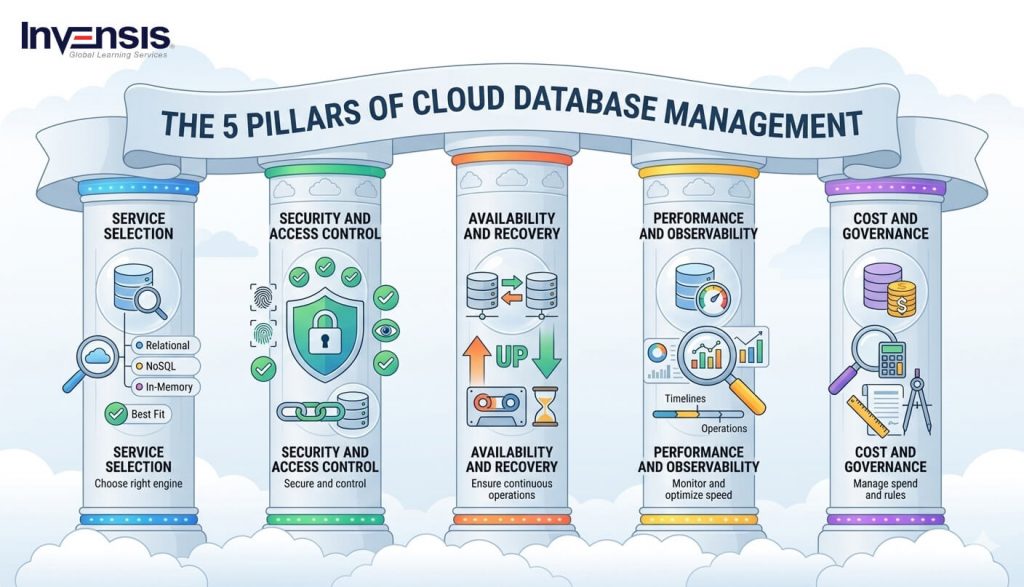
Cloud database management is the discipline of administering databases that run in public, private, hybrid, or multicloud environments. It includes provisioning, access control, configuration, backup, recovery, patching, scaling, performance tuning, cost optimization, and governance. The database itself may be relational or non-relational, but the management goal is the same: keep data secure, available, performant, and aligned with business demand.
|
Expert Perspective “The world is experiencing a digital transformation, and that transformation is powered by data. Organizations need to embrace the cloud and AI in order to unlock new insights and opportunities. Cloud databases are at the core of this transformation, enabling businesses to scale and innovate in ways that were not possible before.” — Satya Nadella, CEO of Microsoft |
 |
A cloud database differs from a traditional on-premises database not because it stops storing structured or unstructured data, but because it inherits the elasticity and service model of cloud computing. According to Google Cloud, cloud databases can be delivered as managed database-as-a-service (DBaaS) offerings or deployed on cloud-based virtual machines and operated by internal teams. That distinction is central to cloud database management because it determines who is responsible for upgrades, monitoring, security hardening, and routine maintenance.
In practical terms, cloud database management sits at the intersection of database administration, cloud operations, cybersecurity, and cost governance. A strong cloud database strategy is not just about “moving a database to the cloud.” It is about deciding which engine to use, which service model fits the workload, how availability and recovery will be handled, how performance will be monitored, and how to avoid unnecessary operational complexity over time.
How Does Cloud Database Management Actually Work?
Cloud database management starts with provisioning. Teams choose a database engine, service tier, storage class, region, network configuration, and access model based on workload needs. In managed platforms such as Azure SQL Database, much of the infrastructure and platform administration is handled by the provider, including high availability, routine maintenance, and some security functions. In self-managed models, teams provision virtual machines and remain responsible for installing, configuring, patching, and maintaining the database stack themselves.
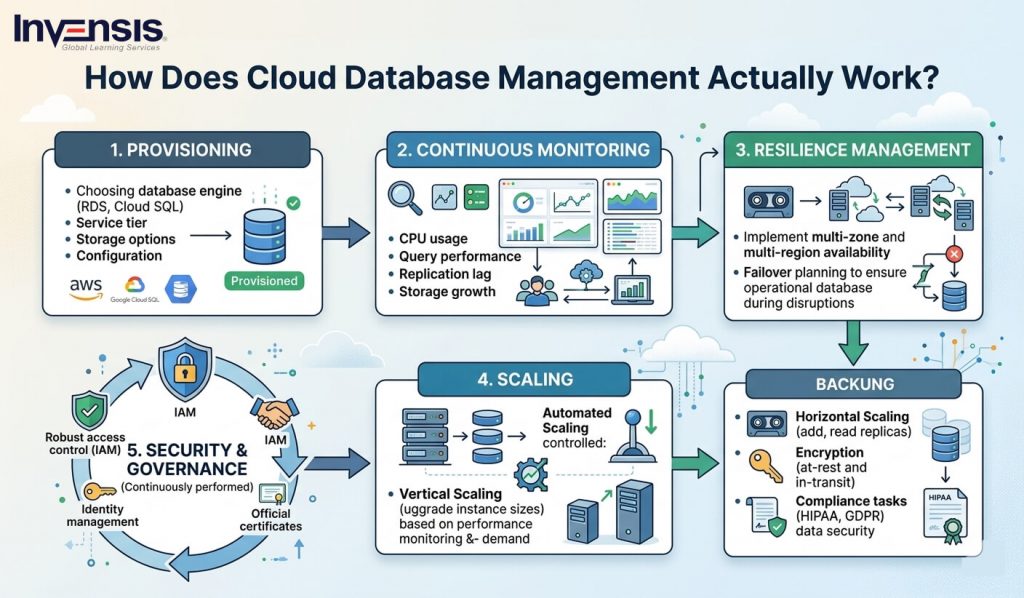
The next major layer is operations and monitoring. Once the database is live, teams must monitor CPU, memory, storage growth, I/O, query performance, connection counts, replication lag, and error events. Good cloud database management relies on alerting, dashboards, health checks, and performance baselining so that issues can be detected before they affect users. Managed services automate parts of this, but they do not eliminate the need for observability or operational ownership.
Then comes resilience management. That includes backups, point-in-time recovery, multi-zone or multi-region availability, failover planning, and disaster recovery testing. Azure highlights built-in high availability and business continuity features in its fully managed SQL offering, while Google Cloud emphasizes automated backups and disaster recovery support as a major advantage of cloud database platforms. These capabilities reduce operational burden, but they still need to be configured according to recovery objectives rather than assumed to be sufficient by default.
Cloud database management also includes security and governance. This covers identity and access management, encryption, key management, network isolation, audit logging, data classification, and compliance mapping. The reason this matters is clear in recent data: Thales found that cloud security remains a top concern for enterprises, with 64% viewing it as a pressing discipline and 55% saying securing cloud environments is more complex than securing on-premises ones
Finally, effective cloud database management requires continuous optimization. Teams must review sizing, storage tiers, replication strategy, query patterns, and vendor-specific features to control cost and maintain performance. Gartner warns that unrealistic expectations and uncontrolled costs will contribute to cloud dissatisfaction, predicting that 25% of organizations will experience significant dissatisfaction with cloud adoption by 2028. In other words, cloud databases solve many problems, but only when they are actively governed.
| RESEARCH INSIGHT
25% of organizations will have experienced significant dissatisfaction with their cloud adoption by 2028, due to unrealistic expectations, suboptimal implementation and/or uncontrolled costs. |
What Types of Cloud Databases and Deployment Models Should You Know?
This is the core of cloud database management: you cannot manage well what you have not categorized correctly. The two first two decisions are database type and deployment model.
Relational vs. Non-relational cloud databases
Google Cloud classifies cloud databases broadly into relational and non-relational systems. Relational databases store data in tables with fixed schemas and are best for structured data, transactions, and consistency-heavy workloads. Examples include MySQL, PostgreSQL, SQL Server, Oracle, Cloud SQL, and Spanner. Non-relational databases, by contrast, handle unstructured or semi-structured data more flexibly and include document, key-value, wide-column, and other NoSQL patterns. Examples include MongoDB, Redis, Cassandra, and Bigtable.
AWS expands the picture further by organizing cloud databases by workload pattern: relational, key-value, in-memory, document, graph, wide-column, and time-series. This is helpful because it shows that cloud database management is no longer about choosing one general-purpose database for every use case. Instead, teams increasingly choose purpose-built engines based on latency requirements, schema flexibility, relationship depth, or analytical needs.
Self-managed vs. managed databases
Google Cloud defines two main management models:
- Traditional self-managed cloud databases, where teams install and run the database on cloud virtual machines
- Managed database services (DBaaS), where the provider handles most operational and administrative tasks such as provisioning, scaling, upgrades, security support, and health monitoring
This distinction dramatically changes the management burden. In a self-managed model, your team keeps more control, but also owns patching, backups, scaling design, failover setup, and operational tooling. In a managed model, the provider reduces routine administration, but you still remain responsible for architecture, permissions, query performance, data modeling, resilience policy, and cost discipline.
A practical comparison
| Decision area | Self-managed cloud DB | Managed cloud DB / DBaaS |
| Infrastructure setup | Owned by internal team | Handled by provider |
| Patching and upgrades | Internal responsibility | Mostly automated/provider-led |
| Availability features | Must be designed and maintained | Often built-in |
| Operational effort | Higher | Lower |
| Custom control | Higher | Moderate to high, but platform-bounded |
| Best fit | Specialized control needs, legacy tuning, custom tooling | Faster deployment, lower admin burden, mainstream application workloads |
Examples from major cloud providers
Google Cloud highlights managed services such as Cloud SQL, Spanner, Bigtable, Firestore, and Memorystore. Azure SQL Database positions itself as a fully managed SQL service with built-in high availability, threat detection, and elastic scaling models. AWS organizes its offerings around workload types, supporting everything from transactional systems to graph and time-series workloads. Together, these models show that cloud database management is increasingly about selecting the right managed abstraction for the workload, not just migrating an old database to a new location.
Why Are Organizations Moving to Managed Cloud Databases?
The strongest driver is operational efficiency. Google Cloud notes that managed cloud databases reduce operational overhead by removing the need to manage physical infrastructure and much of the routine software maintenance. Azure similarly promotes its fully managed SQL service as one where Microsoft handles availability, performance, and core administration tasks. This allows internal teams to spend less time patching and more time building products and data services.
The second reason is agility and scalability. Cloud databases can be launched or decommissioned quickly, and many managed services support elastic scaling. This is especially important for applications with variable demand, SaaS workloads, and product teams that need to test quickly without long infrastructure lead times. Azure’s elastic pools are a good example of how cloud database platforms support shared, scalable SaaS patterns.
The third driver is reliability and resilience. Cloud providers build in features such as automated backups, high availability, replication, and disaster recovery support. These features are not unique to the cloud, but in managed environments, they are easier to activate and operate at scale than in many traditional data center environments.
A fourth driver is database choice. AWS’s database portfolio illustrates how cloud providers now support many specialized workloads, from graph traversal to IoT telemetry and low-latency caching. The result is that teams can choose databases optimized for a specific application profile instead of forcing one engine to handle all use cases.
What Are the Biggest Challenges and Risks in Cloud Database Management?
The first major challenge is the complexity of security. Moving a database to the cloud does not automatically make it secure. Thales found that 55% of organizations consider securing cloud environments more complex than securing on-premises environments, while 68% cited credential and stolen secrets as the fastest-growing attack tactics on cloud infrastructure. That makes identity governance, key management, and secret handling critical parts of cloud database management.
The second challenge is cost visibility. Cloud databases are easy to provision, which is exactly why they are also easy to overspend on. Storage growth, read replicas, cross-region transfer, burst I/O, and poorly tuned workloads can quietly inflate monthly costs. Gartner explicitly warns that uncontrolled costs are a major source of cloud dissatisfaction
The third challenge is migration and integration complexity. Google Cloud lists complex migrations, integration difficulties, vendor lock-in concerns, cost underestimation, and cloud security worries as important planning considerations. Databases are deeply tied to applications, schemas, business logic, and latency expectations, so migration is rarely a simple “lift and shift” activity.
The fourth challenge is multicloud fragmentation. Gartner notes that many organizations struggle to connect and operate effectively across multiple cloud providers, and predicts that more than 50% of organizations will not get expected results from their multicloud implementations by 2029. For database teams, this means more tools, more policies, more replication complexity, and more governance overhead.
What Best Practices Improve Performance, Security, and Cost?
Start with database-service fit. Choose the engine and service model that match the workload. Avoid overengineering with a highly complex distributed platform if a managed relational service is enough. Likewise, do not force a relational database to behave like a document store if the application clearly needs schema flexibility or massive key-value throughput.
Next, implement least-privilege access and encryption by default. Thales’ 2025 findings show that sensitive cloud data exposure is rising faster than enterprise protection maturity. Access should be role-based, credentials rotated, secrets managed centrally, encryption enabled in transit and at rest, and key management reviewed regularly.
Then build backup, restore, and failover discipline. Cloud providers make backups easier, but restore success is what actually matters. Test point-in-time recovery, verify retention policies, document recovery targets, and simulate failover so that recovery is measured rather than assumed.
You should also treat monitoring and cost governance as first-class database functions. Track storage growth, replica usage, compute consumption, and expensive queries. Set budgets and alerts. Review idle environments and oversized instances regularly. Gartner’s cloud dissatisfaction prediction makes it clear that cost discipline is not optional anymore.
Finally, document data residency and sovereignty requirements early. Gartner expects more than 50% of multinational organizations to have digital sovereign strategies by 2029, which means data location, jurisdiction, encryption, and workload portability are becoming board-level concerns, not just technical settings.
| PRO TIP If your team is new to cloud database operations, standardize first on one managed relational platform for common workloads. That reduces operational variation and lets you build repeatable guardrails before expanding into graph, document, or time-series services. |
What Trends Will Shape Cloud Database Management Next?
The biggest trend is AI-driven data demand. Gartner predicts that 50% of cloud compute resources will be devoted to AI workloads by 2029, up from less than 10% today. That means cloud databases will increasingly need to support AI-adjacent use cases such as retrieval, operational feature storage, high-volume inference telemetry, vector-like retrieval patterns, and mixed transactional-analytical workloads.
|
Expert Perspective “As we move into the era of AI, cloud databases are going to be at the heart of every data-driven decision. The ability to process massive amounts of data in real-time and to leverage machine learning to provide actionable insights is becoming increasingly important. Cloud databases are no longer just repositories for information; they are now integral parts of AI-driven innovation.” — Thomas Kurian, CEO of Google Cloud |
 |
The second trend is multicloud and cross-cloud architecture. As organizations distribute workloads across providers, database management becomes less about one platform and more about interoperability, portability, and unified governance. Gartner’s warning that many multicloud adopters will fail to meet expectations is especially relevant here. Cloud database management will increasingly require policy consistency across environments, not just good administration within a single provider.
The third trend is digital sovereignty and compliance-aware architecture. Data location, foreign jurisdictional exposure, and encryption controls are becoming major architectural decisions. Gartner expects digital sovereign strategies to rise sharply among multinational organizations, which means database teams will need stronger collaboration with legal, risk, and compliance stakeholders.
The fourth trend is security maturity pressure. Sensitive cloud data continues to grow faster than strong encryption and operational controls. In the coming years, cloud database management will be judged not just by uptime and speed, but by encryption coverage, secret hygiene, access governance, and recoverability.
| RESEARCH INSIGHT 54% of data in the cloud is sensitive, up from 47% last year. Only 8% of respondents encrypt 80% or more of their cloud data. |
Conclusion
Cloud database management is an essential component of modern IT infrastructures, enabling organizations to scale their operations seamlessly while ensuring security, performance, and cost-efficiency. As businesses increasingly shift to cloud environments, effective cloud database management becomes pivotal in overcoming the complexities of security, operational overhead, and resource allocation. Whether choosing between self-managed and managed database models, it’s crucial to understand your workloads’ unique needs to select the right database type and service model. By focusing on best practices such as encryption, monitoring, and cost governance, teams can maintain a secure, resilient cloud database ecosystem.
To effectively manage cloud databases, a solid understanding of various database technologies and management practices is crucial. Edstellar offers a comprehensive range of courses that delve into cloud computing and database management. Our DevOps courses are designed for IT professionals who want to master the intricacies of cloud database deployment, optimization, and security. Additionally, if you’re looking to deepen your cloud infrastructure knowledge, courses like Azure DevOps and AWS DevOps can provide the foundational skills to navigate the complexities of the cloud landscape and stay ahead in an increasingly digital world.
Frequently Asked Questions
What is cloud database management in simple terms?
It is the process of deploying, securing, monitoring, backing up, scaling, and optimizing databases that run in cloud environments.
What is the difference between a cloud database and a managed cloud database?
A cloud database can be either self-managed on cloud infrastructure or delivered as a managed service. A managed cloud database reduces operational work by letting the provider handle much of the maintenance and platform administration.
Is cloud database management only for large enterprises?
No. Managed cloud databases are often especially useful for startups and mid-sized teams because they reduce infrastructure overhead and speed up deployment.
What are the main risks in cloud database management?
The biggest risks include weak access control, poor encryption hygiene, uncontrolled cloud spend, difficult migrations, and multicloud complexity.
Which cloud database type should I choose?
Choose based on workload. Relational databases suit structured transactions, while document, key-value, graph, in-memory, wide-column, and time-series systems fit different performance and data-model needs.
Why is security such a big part of cloud database management?
Because cloud data sensitivity is growing faster than many organizations’ protection maturity. Thales reports that over half of cloud data is sensitive, yet strong encryption coverage remains low.
How is AI affecting cloud database management?
AI is increasing demand for scalable, high-performance cloud data platforms and is pushing organizations to rethink workload placement, compute allocation, and data proximity.